
Your SAP lifecycle,
with AI
Four groups, ten AI skills, your own ABAP code on DEV. By 15:00: your AI SDLC guide and an onboarding guide for every new colleague.
Two things we build today
1 · AI SDLC guide
Your 10 development steps, from Jira ticket to production. For each one: what AI does, which skill, who decides, one team rule.
docs\sdlc-guide.md
2 · Onboarding kit
What a new team member installs, in which order, how to check it works, where the rules live. Plus the team CLAUDE.md.
docs\onboarding.md · CLAUDE.md
The install, the groups and the skills are how we learn what to write into these two files.
Today
| Time | What | Result |
|---|---|---|
| 10:00 | Welcome, the two deliverables, words we use | Everyone knows the goal |
| 10:15 | Install, step by step, everyone on their own laptop | Claude Code inside Eclipse |
| 10:50 | Install check + morning write test | One working laptop per group |
| 11:05 | Live demo on a real Z program | Everyone sees AI read your DEV |
| 11:20 | Split into four groups, roles | |
| 11:30 | Groups, block 1 | First result per group |
| 12:30 | Lunch | |
| 13:30 | Groups, block 2 (swap roles) | Finished group output |
| 14:20 | Demos, 4 minutes per group | One team rule per group |
| 14:40 | Write it down: SDLC guide rows, onboarding, CLAUDE.md | Guide v1, onboarding v0 |
| 14:55 | Owners and next steps | Who owns which step |
Same AI, same 180 ABAP tasks. One difference.
correct, when it writes once and never sees the result
correct, when it sees the errors and fixes them itself
Today we connect that loop to your DEV: syntax check, activation, ABAP Unit, ATC.
Tasks: TH Köln ABAP benchmark, arXiv 2601.15188. Numbers: Claude Opus 4.6 on the public leaderboard by Marian Zeis (8 Apr 2026): 36.9% first try, 84.2% after up to 5 feedback rounds.
Words we use today
| Word | In plain words |
|---|---|
| DEV | The development SAP system. The only one AI touches. Never QAS, never PRD. |
| Package | A folder for ABAP objects in SAP. Every class or program lives in one. |
| ZAI_WORKSHOP | The package made for today. AI may write only here. It holds copies, never originals. |
| DDIC | Data Dictionary: the definitions of tables, structures and data types. AI reads the structure, never the data. |
| Transport | The parcel that carries changes DEV → QAS → PRD. Only people create and release it. |
| ADT | ABAP Development Tools: SAP’s plug-in that makes Eclipse an ABAP editor. |
| MCP server | The bridge inside Eclipse that lets Claude read and change ABAP on DEV. |
| Skill | A ready-made recipe for one task, e.g. /sap-abap:spec-grill. Each one is a text file you can read. |
| ATC · ABAP Unit | SAP’s automatic code checks · automatic tests that prove the code does what it should. |
| Diff | What changes: red lines removed, green lines added. A person reads it before saying yes. |
How it fits together

localhost:2234 · token

Eclipse’s own connection to SAP

sap-abap plugin
The 10 skills, as slash commands.CLAUDE.md
The team rules Claude reads every session.Your Jira skill
Reads Jira tickets inside the company network.Safe by default
AI may
- Read code and DDIC from any package on DEV
- Write only in
ZAI_WORKSHOP, on copies - Run syntax check, activation, ABAP Unit, ATC
- Draft specs, tests, reviews, docs
AI may not
- Touch QAS or PRD
- Create or release transports
- Read table contents or dumps from the system
- Write without a person approving it
7
steps to Claude Code inside Eclipse
10:15 to 10:50. Everyone on their own laptop. One step is for the admin only.
Install 1 of 7
Eclipse with ADT, connected to DEV
- Open Eclipse. Menu Help → About Eclipse IDE → Installation Details. Find “ABAP Development Tools”. The version must be 3.62 or higher.
- Lower or missing? Help → Install New Software → field “Work with” → paste the address below → tick ABAP Development Tools → Next → accept → Finish → Restart.
https://tools.hana.ondemand.com/2026-09 - Connect DEV: File → New → Project → ABAP → ABAP Project → choose DEV from the SAP Logon list → client, user, password → Finish.
Install 2 of 7 · admin step · one person, once
The workshop package ZAI_WORKSHOP
One admin (the internal lead) does this once, in SAP. Everyone else continues with step 3.
- Transport: transaction SE09 → Create (F6) → Workbench request → description “AI workshop” → Save. Write the number (DEVK9…) on the whiteboard.
- Package: in Eclipse File → New → ABAP Package → name
ZAI_WORKSHOP, type Development, your software component and Z transport layer → pick the transport → Finish. - Copies for groups 2 to 4: right-click the object → Duplicate → new name
ZAI_G2_…,ZAI_G3_REPORT,ZAI_G4_…→ packageZAI_WORKSHOP. - Test class
ZAI_TEST_CLASSwith one ABAP Unit test, for the morning write test. - Inputs: 2 Jira ticket numbers, the name of 1 old Z program,
spec.mdfor 1 small change,dump.txtwithout personal data.
This becomes a standard admin step in your onboarding guide: a new project or team gets its own AI package the same way.
Install 3 of 7
Claude Code on Windows
- Start menu → type PowerShell → open “Windows PowerShell” (no admin rights needed).
- Paste this line (right-click pastes) and press Enter. Wait for “installation complete”:
irm https://claude.ai/install.ps1 | iex - Close PowerShell, open it again, type
claude, press Enter. A browser opens: log in with your company account, never a private one. - Check:
claude --version
git --version; if that fails too, IT installs Git for Windows.Install 4 of 7
The team folder and the terminal in Eclipse
- Unzip the starter kit from your trainer to
C:\: right-click the zip → Extract All… → typeC:\→ Extract. You now haveC:\sap-ai. - In Eclipse: Window → Show View → Other… → type “Terminal” → select Terminal → Open.
- In the Terminal view click the small monitor icon “Open a Terminal” → Local Terminal → OK.
- Go to the team folder and start Claude:
cd C:\sap-ai
claude
› at the bottom of Eclipse. Code on top, AI below, one window.Why this folder: Claude reads CLAUDE.md and the list of blocked tools from the folder you start it in.
Install 5 of 7
Switch on SAP’s MCP server
- Window → Preferences → ABAP Development → MCP Server.
- Tick Enable ADT MCP Server and Enable access restrictions.
- Projects: add only DEV. Packages: add
ZAI_WORKSHOP. - Tick Enable Edit File tool. Without it AI can only read.
- Click Copy token, keep it for the next step → Apply and Close.
- So the server starts with Eclipse: open
eclipse.iniin Notepad (in the Eclipse folder, e.g.C:\eclipse\), add this line under-vmargs, save, restart Eclipse:-DadtMcpServerPrefEnabled=true
Install 6 of 7
Connect Claude Code to the server
- In the Eclipse terminal. If you see Claude’s prompt
›, type/exitfirst: this command runs in the plain terminal. - Replace
<TOKEN>with the token you copied (right-click pastes), then Enter:claude mcp add --transport http --scope user abap-adt http://localhost:2234/mcp --header "Authorization: Bearer <TOKEN>" - Check:
claude mcp list
abap-adt: … ✔ connectedclaude mcp remove abap-adt, then add it again.Install 7 of 7
The 10 skills and the team rules
- Start Claude in the team folder:
cd C:\sap-ai, thenclaude. - Type these two lines, one by one, Enter after each:
/plugin marketplace add marian-kamenistak/sap-ai-skills /plugin install sap-abap@sap-ai-skills - Restart Claude:
/exit, thenclaude. - Type
/sap-abap:and wait: a list of 10 skills appears. - Type
/memory: it must listC:\sap-ai\CLAUDE.md. That file is the team rulebook.
You can write prompts in Czech. The skills answer in the language you write in.
10:50
Install check: every laptop
- Help → About: ADT 3.62+, DEV connected
-
claude --versionanswers, logged in with the company account claude mcp list→abap-adtconnected/sap-abap:shows 10 skills,/memoryshows CLAUDE.md- Ask: › Find class ZCL_… and explain what it does.The answer must name your tables and fields.
Not working on your laptop? No problem: each group needs one laptop where it works. Write down what failed: it goes into the onboarding guide at 14:40.
Morning write test: 5 minutes, once, on the big screen
- The lead, on one laptop: › Change the comment in the first line of ZAI_TEST_CLASS to "AI write test", then check, activate and run its ABAP Unit tests and ATC.
- Claude asks before each step. Read the diff, then say yes.
- In Eclipse press Ctrl+Shift+F3:
ZAI_TEST_CLASSmust not be in the list of inactive objects. - Negative test: › Change a comment in <any object outside ZAI_WORKSHOP>.The server must refuse.
Pass → groups 2 to 4 let AI write in ZAI_WORKSHOP. Fail → fallback: Claude prepares the code, a person pastes it into Eclipse (Ctrl+S, then Ctrl+F3 to activate).
11:20 · stand up, 5 minutes
Split into four groups
Specs and understanding code
Turn a Jira ticket into a clear spec. Explain an old program nobody understands.
spec-grill · reverse-engineer
AI only reads
Build and tests
Let AI make one small real change, with tests. You approve every write.
implement · test-case
AI writes in ZAI_WORKSHOP
Review and modernisation
Find what is wrong in an old report. Make it cleaner and faster, and measure it.
code-review · refactor · cds-rewrite
AI writes in ZAI_WORKSHOP
Bugs, docs, transport
From a dump to the cause and the fix. Document it and prepare the transport texts.
bugfix · documentation · transport-release
AI reads, fixes in a copy
Every group works on real code from your DEV system and hands in rows of the SDLC guide.
How to form the groups
- 3 to 5 people per group. Four corners of the room, one per group.
- The most experienced ABAP developers split up, one per group. Groups 2 and 3 first: they write code.
- People who know the tickets and the business (consultants) start in groups 1 and 4.
- Every group has someone who knows the code and someone who is new to it.
- The newest person types first. It is the fastest way to learn.
Fewer than 10 people? Make three groups; the lead decides which topic waits.
| Group | Names |
|---|---|
| 1 | |
| 2 | |
| 3 | |
| 4 |
Work as a mob: one laptop, one task, everyone helps
Driver
1 person
Types the prompts on the group laptop. Types what the group says, does not decide alone.
Approver
1 person
Reads what Claude wants to do and says yes or no. Before every write: reads the diff aloud in plain words.
Note-taker
1 person, own laptop
Writes down the prompts that worked, where AI was wrong, where a person had to step in.
Followers
everyone else
Watch the screen, ask “why?”, look things up on their own laptops. Read only, never write from a second laptop.
Swap roles after lunch. The Approver never picks “Yes, and don’t ask again” for edit, create or activate.
Ten skills along your SDLC
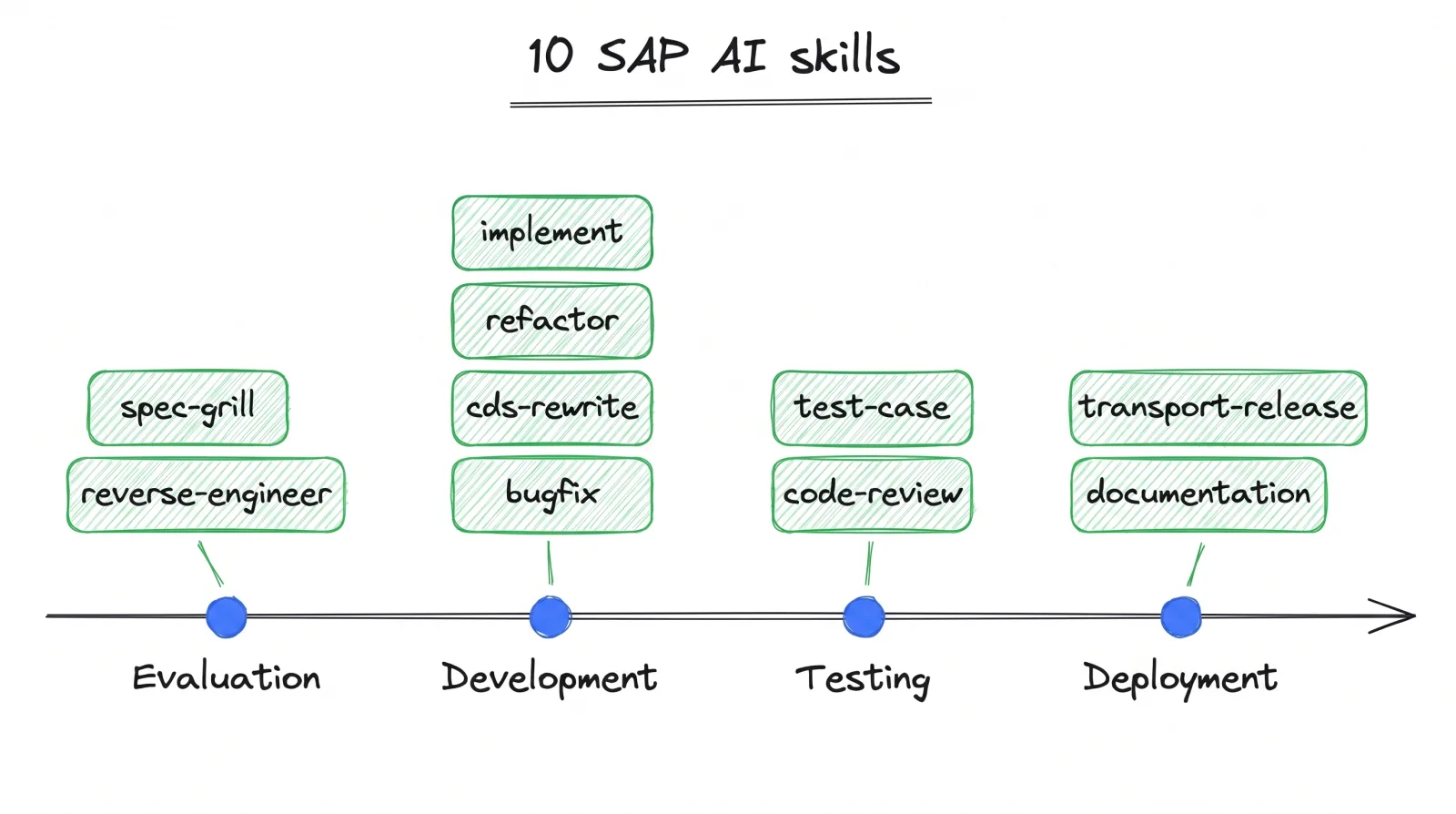
The rule for today: before you run a skill, open its file and read how it works. Two minutes.
The files are on GitHub: marian-kamenistak/sap-ai-skills → skills/<skill>/SKILL.md.
Run a skill by name, e.g. /sap-abap:spec-grill, or describe the task and Claude picks the skill.
1
Group 1
Specs and understanding code
Before anyone writes code, make sure everyone understands what the ticket wants and how the old program works.
You start with
- Two Jira ticket numbers
- The name of one old Z program
You show at 14:20
- spec-1.md scored 8 or more
- program-explained.md with 3 checked claims
Before you run it
/sap-abap:
spec-grill
github.com/marian-kamenistak/sap-ai-skills → skills/spec-grill/SKILL.mdThe Note-taker reads the “Workflow” part aloud. Then run the skill.
How this skill works
spec-grill
Turns a ticket into a spec a developer can build without guessing.
- Reads the ticket and gives it a first score, 0 to 10.
- Asks one question at a time, weakest point first.
- Checks every table or program you name on DEV: does it exist?
- Writes acceptance criteria with you: given / when / then.
It stops and waits for you
Scores again. Below 8 it lists what is missing. The ticket author says when it is done.You get
A spec in Markdown with a score table and open questions. It never invents a business rule.Group 1 · block 1 · 11:30–12:30
Get the ticket into a file
- Driver types: › Load ticket <ID> with our Jira skill and save description, acceptance criteria and comments to ticket-1.mdYou will see Claude asks “May I run…?” → the Approver says yes. A file
ticket-1.mdappears inC:\sap-ai. - Outside the company network? Open the ticket in Jira, copy the text, ask Claude: › Save this text as ticket-1.md: <paste>
Group 1 · block 1 · 11:30–12:30
Sharpen the spec
- › /sap-abap:spec-grill Sharpen the spec in ticket-1.md. Ask me one question at a time.You will see One question at a time: “Which company codes?”, “What happens if the field is empty?”You do The person who knows the business answers. Nobody knows? Answer “we don’t know”: it becomes an open point. That is a result too.
- Claude looks up every table or program the ticket names on DEV. Something does not exist? That is your first finding: the Note-taker writes it down.
Group 1 · block 1 · 11:30–12:30
Score it and save it
- › Score the spec 0 to 10 and list what is missing to reach 8.
- Below 8? Answer the missing points, ask for the score again.
- › Save the final spec to spec-1.md, with the open points at the end.
- Note-taker: how many questions, how long it took, what surprised you.
Before you run it
/sap-abap:
reverse-engineer
github.com/marian-kamenistak/sap-ai-skills → skills/reverse-engineer/SKILL.mdThe Note-taker reads the “Workflow” part aloud. Then run the skill.
How this skill works
reverse-engineer
Explains how existing code works, with proof from the code.
- Repeats your question in one clear sentence.
- Finds the entry point: transaction, report or job.
- Follows the call chain step by step, with program and line.
- Draws one diagram of how the data flows.
It stops and waits for you
For a “why” question it ranks the possible causes. A person confirms in the debugger.You get
Call chain, diagram, open ends. Read-only: it never changes code.Group 1 · block 2 · 13:30–14:20
Swap roles. How does the old program work?
- › /sap-abap:reverse-engineer Explain how program <ZPROGRAM> works: entry point, call chain, where-used, data flow. Draw a Mermaid diagram. Save it to program-explained.md.You will see Claude asks to read objects from DEV, one after the other. Reading is safe: here “Yes, and don’t ask again” is fine.
- The where-used part is empty? In Eclipse open the program, right-click its name → Get Where-used List (Ctrl+Shift+G) → copy the list → paste it to Claude.
Group 1 · block 2 · 13:30–14:20
Check Claude, then do ticket 2
- The person who knows the program picks three claims from Claude’s explanation and checks them in the code (Ctrl+click jumps to a method). Right or wrong? The Note-taker writes it down.
- A wrong claim is valuable: it becomes a team rule (“always check X yourself”).
- Time left: spec-grill on ticket 2, faster. Time it and compare with how long a spec usually takes.
Group 1
When you get stuck
- Where-used is empty → Eclipse where-used (Ctrl+Shift+G), paste the list.
- Tables are read as structures (DDIC), never with their data.
- your Jira skill fails → copy the ticket text by hand.
Write every “stuck” moment down: it goes into the onboarding guide. Your rows in the SDLC guide: 1 and 2.
2
ZAI_WORKSHOP, only on the copy.Group 2
Build and tests
Let AI make one small real change in a copy of the code, with tests. A person approves every single write.
You start with
- spec.md: one small change
- The copy
ZAI_G2_… - The transport number
You show at 14:20
- An activated change in the copy
- Green unit tests
- qas-tests.md
Before you run it
/sap-abap:
implement
github.com/marian-kamenistak/sap-ai-skills → skills/implement/SKILL.mdThe Note-taker reads the “Workflow” part aloud. Then run the skill.
How this skill works
implement
Builds a change from an approved spec: code, tests, transport.
- Reads the spec (score 8 or more) and every object it touches.
- Proposes two technical options. You pick one.
- Writes the tests first, one per acceptance criterion.
- Writes the code, activates, runs the checks, fixes, repeats.
It stops and waits for you
Twice: after the two options, and when it shows the full diff for review.You get
Code and tests in DEV on your transport, plus a short technical note for Jira.Group 2 · block 1 · 11:30–12:30
Two options before any code
- › /sap-abap:implement The spec is in spec.md. The object is ZAI_G2_… in package ZAI_WORKSHOP. Read it and its where-used and propose two technical options with impact and risks. Do not write code yet.You will see Two options, A and B, each with what changes and what could break.You do The most experienced developer explains both in plain words. The group picks one. The Note-taker writes down why.
Group 2 · block 1 · 11:30–12:30
Let Claude write, read every diff
- › Implement option A in ZAI_G2_…. Write only to ZAI_WORKSHOP, transport <TR>. Then run the syntax check and activate.You will see “May I edit ZAI_G2_…?” with a diff: red = removed, green = added.You do The Approver reads the diff aloud: “it adds a check for an empty field”. Makes sense → Yes, for this one call. Not sure → No, and tell Claude why.
Group 2 · block 1 · 11:30–12:30
Is it really active?
- In Eclipse press Ctrl+Shift+F3:
ZAI_G2_…must not be in the inactive list. If it is, activate it there. - Open the object (Ctrl+Shift+A, type its name) and look at the change yourself.
- Write refused (fallback)? Ask: › Show me the complete new source of ZAI_G2_….The Driver copies it into the editor, Ctrl+S, Ctrl+F3.
Before you run it
/sap-abap:
test-case
github.com/marian-kamenistak/sap-ai-skills → skills/test-case/SKILL.mdThe Note-taker reads the “Workflow” part aloud. Then run the skill.
How this skill works
test-case
Writes ABAP Unit tests and QAS test scenarios from the spec.
- Lists what to prove: each acceptance criterion and edge case.
- Plans how to replace the database in the tests.
- Writes one test per row, named for the behaviour.
- Runs them, then writes manual scenarios for QAS.
It stops and waits for you
After the plan: a person approves it and any change to the code.You get
Test class, results, QAS scenarios. A real defect it reports, it does not fix it here.Group 2 · block 2 · 13:30–14:20
Swap roles. Tests from the spec
- › /sap-abap:test-case Write ABAP Unit tests for ZAI_G2_… from the acceptance criteria in spec.md, given/when/then. We are on 7.40: isolate the database with an interface and a local test double.
- The class reads the database itself? Claude first proposes a small interface for the data access. The most experienced developer approves it before anything is written.
- Approve each write after reading the diff, as before.
Group 2 · block 2 · 13:30–14:20
Run the checks, fix, describe
- › Run ABAP Unit and ATC on ZAI_G2_… and fix what fails.
- Check yourself in Eclipse: Ctrl+Shift+F10 runs the unit tests (green bar = good). ATC: right-click → Run As → ABAP Test Cockpit.
- › Write manual test scenarios for QAS and a short technical note for the ticket. Save them to qas-tests.md.
Group 2
When you get stuck
- Write refused → fallback: Claude shows the code, a person pastes and activates it.
- On 7.40 the tests use an interface and a test double (the newer test tools need 7.51).
- ATC over the MCP server is missing → run it in Eclipse yourself.
- “Activated” but still inactive → Ctrl+Shift+F3 and activate in Eclipse.
Write every “stuck” moment down: it goes into the onboarding guide. Your rows in the SDLC guide: 3 and 4.
3
ZAI_WORKSHOP, only on the copy.Group 3
Review and modernisation
Find what is wrong in old code, then make it better without changing what it does. Measure, do not guess.
You start with
- The copy
ZAI_G3_REPORT - Test data on DEV
- Access to SAT or ST05
You show at 14:20
- review.md with a decision per finding
- Tests + refactor or CDS proposal
- Runtime before and after
Before you run it
/sap-abap:
code-review
github.com/marian-kamenistak/sap-ai-skills → skills/code-review/SKILL.mdThe Note-taker reads the “Workflow” part aloud. Then run the skill.
How this skill works
code-review
Reviews code like a strict senior colleague. It changes nothing.
- Lists what is under review.
- Runs ATC first.
- Reads the code against a checklist: security, correctness, performance, Clean ABAP, your team rules.
- Rates each finding: Blocker, Major, Minor or Info, with a proposed fix.
It stops and waits for you
At the end: it hands over. The author decides what to fix.You get
A findings table ordered by severity, ready to paste into Jira.Group 3 · block 1 · 11:30–12:30
Review the old report
- › /sap-abap:code-review Review ZAI_G3_REPORT. Start from ATC, then Clean ABAP, missing AUTHORITY-CHECK, SELECT in loops, SELECT *, FOR ALL ENTRIES with an empty table, performance. Give each finding a severity and a fix. Save it to review.md.You will see A list of findings, most serious first. Example: “SELECT inside LOOP: asks the database 1,000 times instead of once.”
Group 3 · block 1 · 11:30–12:30
Decide finding by finding
- The most experienced developer explains each finding in one sentence. The group decides: fix, keep (and why), or Claude is wrong.
- Every “Claude is wrong” goes to the Note-taker: it becomes a team rule.
- Pick the one finding worth fixing first.
Before you run it
/sap-abap:
refactor
github.com/marian-kamenistak/sap-ai-skills → skills/refactor/SKILL.mdThe Note-taker reads the “Workflow” part aloud. Then run the skill.
How this skill works
refactor
Makes old code cleaner without changing what it does.
- Maps the code and what its callers depend on.
- Writes tests that record today’s output. They must pass on the old code.
- Plans small steps, smallest first.
- One step at a time: change, activate, run the tests. Red test → undo the step.
It stops and waits for you
After the plan, and after each step when it shows the diff.You get
The tests, the diff per step, a transport description.Group 3 · block 2 · 13:30–14:20
Swap roles. First: tests that record what the report does today
- › /sap-abap:refactor Write characterization tests that pin today’s output of ZAI_G3_REPORT on our test data. 7.40: interface + test double.
- Why first: before we change old code, we save its current result. The tests run the report on test data and remember what comes out.
- After every change the tests run again. Same result = nothing broke. Different result = the change broke something, undo it.
- Measure the speed before: transaction SAT → program ZAI_G3_REPORT → Execute, twice. Write down the second runtime.
Before you run it
/sap-abap:
cds-rewrite
github.com/marian-kamenistak/sap-ai-skills → skills/cds-rewrite/SKILL.mdThe Note-taker reads the “Workflow” part aloud. Then run the skill.
How this skill works
cds-rewrite
Moves data reading from ABAP loops into a CDS view, and proves it is faster.
- Lists every database access in the program.
- Writes tests that record today’s output.
- Designs the view: what moves to the database, what stays in ABAP.
- Builds it, runs old and new tests, measures runtime before and after.
It stops and waits for you
After the design: no code until a person approves it.You get
Design, view source, before/after numbers. On 7.40: classic DEFINE VIEW only.Group 3 · block 2 · 13:30–14:20
Improve in small steps, measure again
- Either: › Refactor ZAI_G3_REPORT in small steps following Clean ABAP. After each step write, activate and run the tests.
- Or: › /sap-abap:cds-rewrite Propose what moves into a classic CDS view (DEFINE VIEW, 7.40 SP05): joins and filters. What stays in ABAP?
- Measure after, the same way. No measured gain, no rewrite.
Group 3
When you get stuck
- On 7.40 only classic CDS views work (DEFINE VIEW, from SP05).
- Claude cannot create the CDS source → a person creates it in Eclipse (File → New → Other → Data Definition), Claude edits it.
- A test turns red after a step → say no to the next step, ask Claude to undo the last one.
Write every “stuck” moment down: it goes into the onboarding guide. Your rows in the SDLC guide: 5 to 7.
4
Group 4
Bugs, docs, transport
Something broke in production. Find the real cause, prove it, make the smallest fix, document it, prepare the transport texts.
You start with
- dump.txt without personal data
- The ticket it belongs to
- The copy
ZAI_G4_…, the transport number
You show at 14:20
- Cause with proof, test, fix
- docs-ZAI_G4.md
- transport-notes.md
Before you run it
/sap-abap:
bugfix
github.com/marian-kamenistak/sap-ai-skills → skills/bugfix/SKILL.mdThe Note-taker reads the “Workflow” part aloud. Then run the skill.
How this skill works
bugfix
From a dump to a proven cause and the smallest fix.
- Reads the dump: error, program, line, call stack.
- Walks back from the failing line: where did the bad value come from?
- Names the cause and shows the lines that prove it.
- Writes a test that fails because of the bug, then the smallest fix.
It stops and waits for you
Twice: a person confirms the cause before any fix, and reviews the diff after.You get
Cause with evidence, a red-then-green test, the fix, a note for Jira.Group 4 · block 1 · 11:30–12:30
Find the cause, with proof
- › /sap-abap:bugfix The dump is in dump.txt, ticket <ID>. Find where it crashed, walk the call chain back to the entry point and show the lines that prove the cause.You will see The line where it crashed, the path that led there, and Claude’s explanation of why.You do A person confirms the cause in the code or debugger: open the object, go to the line (Ctrl+L), set a breakpoint (double-click the left margin) and reproduce. No confirmation, no fix.
Group 4 · block 1 · 11:30–12:30
Test first, then the smallest fix
- › Write an ABAP Unit test that reproduces the bug, then the smallest fix in ZAI_G4_… (ZAI_WORKSHOP, transport <TR>). Write, activate, run the test.
- The test should be red before the fix and green after. Ask Claude to show both runs.
- The Approver reads each diff aloud before saying yes.
Before you run it
/sap-abap:
documentation
github.com/marian-kamenistak/sap-ai-skills → skills/documentation/SKILL.mdThe Note-taker reads the “Workflow” part aloud. Then run the skill.
How this skill works
documentation
Writes the document a new colleague needs for one object.
- Reads the object, its data types and its where-used.
- Describes purpose, entry points, inputs and outputs, tables, calls, authorizations.
- Draws one sequence diagram of the main path.
- Lists risks and open questions.
It stops and waits for you
At the end: the object owner confirms. Until then the document says “draft”.You get
Markdown, ready for Confluence or the Jira ticket.Group 4 · block 2 · 13:30–14:20
Swap roles. Document what you fixed
- › /sap-abap:documentation Document ZAI_G4_…: purpose, inputs and outputs, tables, who calls it and what it calls, a Mermaid sequence diagram, known risks. Save it to docs-ZAI_G4.md.
- Someone from operations reads it: would this have helped at 3 a.m. during the incident? Fix what is missing.
Before you run it
/sap-abap:
transport-release
github.com/marian-kamenistak/sap-ai-skills → skills/transport-release/SKILL.mdThe Note-taker reads the “Workflow” part aloud. Then run the skill.
How this skill works
transport-release
Checks a transport is complete and writes its release papers.
- Reads the transport: objects, owner, ticket.
- Checks nothing is missing: data elements, texts, dependent objects, import order.
- Reports the gaps.
- Writes the description, the QAS test plan, the PRD checklist and the rollback plan.
It stops and waits for you
After the gaps: a person decides. A person releases the transport, never the skill.You get
Four texts for the release. On 7.40 give it the object list yourself.Group 4 · block 2 · 13:30–14:20
Prepare the transport, do not release it
- › /sap-abap:transport-release The change is on transport <TR>, objects <list>. Write the transport description, a QAS test plan and a rollback plan. Save it to transport-notes.md.
- Do not release the transport today. That stays with people and your normal process.
- › Write the root-cause text for the ticket in plain language.A person pastes it into Jira.
Group 4
When you get stuck
- The dump comes from a file without personal data, on purpose: AI does not read dumps from the system.
- Transports stay manual: a person creates and releases them.
- Where-used is empty → Eclipse where-used (Ctrl+Shift+G).
Write every “stuck” moment down: it goes into the onboarding guide. Your rows in the SDLC guide: 8 to 10.
14:20
Demo: 4 minutes per group
- 1 The input: ticket, program or dump
- 2 What AI did, live or as screenshots
- 3 Where a person stepped in, and why
- 4 Your one team rule for the guide
Write it down
14:40. Fifteen minutes that decide if today lasts.
What is not in the two files tonight is forgotten in two weeks.
14:40 · deliverable 1
The SDLC guide
- Where: the Note-taker’s laptop, file
C:\sap-ai\docs\sdlc-guide.md. It already has all 10 rows; you fill only yours. - What, per row: what AI did today, the prompt that worked, who decides, one team rule.
- How: let Claude do the typing from your notes:
- From tomorrow this file is how the team works.
CLAUDE.mdpoints to it, so Claude follows the same rules as people.- A new colleague reads it on day 1.
At 14:55 each Note-taker sends the file to the lead. The lead asks Claude to merge the four files into one.
The guide: who fills which rows
| # | Step | Skill | Group |
|---|---|---|---|
| 1 | Ticket → spec | spec-grill | 1 |
| 2 | How it works today | reverse-engineer | 1 |
| 3 | Build in DEV | implement | 2 |
| 4 | Tests | test-case | 2 |
| 5 | Code review | code-review | 3 |
| 6 | Refactor | refactor | 3 |
| 7 | Modernise to CDS | cds-rewrite | 3 |
| 8 | Documentation | documentation | 4 |
| 9 | Transport DEV → QAS → PRD | transport-release | 4 |
| 10 | Bug in production | bugfix | 4 |
14:40 · deliverable 2
The onboarding guide
- Where:
C:\sap-ai\docs\onboarding.md, prefilled with this morning’s install steps. - Every group adds to “When something doesn’t work” what blocked it today: symptom, cause, fix.
- One volunteer checks the steps against what we really clicked this morning, the admin step included.
- Test of done: a new colleague installs everything alone, in one morning, without asking anyone.
C:\sap-ai\
├─ CLAUDE.md             rules Claude reads
├─ .claude\settings.json  blocked tools
└─ docs\
   ├─ sdlc-guide.md      deliverable 1
   ├─ onboarding.md      deliverable 2
   └─ skills\            how each skill works
This folder is the starter kit. Later it moves to a team Git repo or a shared drive.
Team CLAUDE.md: the short rulebook
- What: one page of rules Claude reads at the start of every session: system and release, naming, what never goes to AI, how we approve, where the guides are.
- Not the full SDLC guide. It stays short and points to
docs\sdlc-guide.mdanddocs\onboarding.md. - Who: the template is prefilled. Each group adds its one team rule: four lines in total.
- Where:
C:\sap-ai\CLAUDE.md, the folder you start Claude in.
After today
| What | Who | By |
|---|---|---|
| Merge the 4 guide files, finish CLAUDE.md, run the check prompt | ||
Move C:\sap-ai to a team Git repo or shared drive | ||
| An owner for each of the 10 steps and for onboarding.md | ||
| Two weeks: every ticket goes through spec-grill | ||
| The next new colleague installs from onboarding.md alone; fix what they hit | ||
| Review after two weeks: what got faster, what did not |
One ticket,
one skill
Tomorrow, take your next real ticket through spec-grill before anyone writes code. Write down the minutes it took.
Appendix
If something is unclear
Backup slides for questions about the tooling.
Do we need a plugin in Eclipse?
- No. Claude Code runs in Eclipse’s own Terminal view (Window → Show View → Terminal).
- The skills come with the Claude Code plugin
sap-abap, not with an Eclipse plugin. - The link to SAP is SAP’s own ADT MCP server, already part of ADT.
- There is no official Claude plugin for Eclipse. Community ones are unofficial; we leave them out.
Access Restrictions in plain words
| Setting | What it does | Today |
|---|---|---|
| Enable ADT MCP Server | Starts the server inside Eclipse on localhost:2234 | On |
| Enable access restrictions | Master switch. Off = no limits at all | On |
| Projects | Which SAP systems the server may touch | DEV only |
| Packages | Where objects may be created or changed. Reading is allowed everywhere | ZAI_WORKSHOP |
| Enable Edit File tool | Lets AI change source code. Off = read only | On |
Window → Preferences → ABAP Development → MCP Server
Approving a write
- Claude Code asks before every MCP tool call.
- Read the diff, then answer Yes for this one call.
- Never pick “don’t ask again” for edit, create or activate.
- Wrong change? Say no and tell Claude why: it tries again.
{
  "permissions": {
    "deny": [
      "mcp__abap-adt__arc1_sap_http_post",
      "mcp__abap-adt__abap_transport_create_request",
      "mcp__abap-adt__abap_feed_query",
      "mcp__abap-adt__abap_explain_object",
      "mcp__abap-adt__abap_atc_ai_*",
      "mcp__abap-adt__abap_docs_dcp"
    ]
  }
}C:\sap-ai\.claude\settings.json: tools nobody may use
Why transports stay with people
- A transport moves code toward production. That decision belongs to a person.
- Claude writes only into objects already on the transport a person created.
- Claude drafts the description, the QAS test plan and the rollback plan.
- Creating and releasing transports is blocked in the tool settings.
What changes on release 7.40
| Topic | On 7.40 | Workaround |
|---|---|---|
| Writing via SAP’s MCP server | Stated from 7.31 SP04, no public 7.40 test | Morning write test, fallback mode |
| Syntax check via ADT | From 7.40 SP02 | Check your SP level |
| SQL test double (CL_OSQL_TEST_ENVIRONMENT) | Needs 7.51 | Interface + local test double |
| TEST-SEAM | Needs 7.50 | Interface + local test double |
| CDS | Classic DEFINE VIEW from SP05; view entities need 7.55 | Classic CDS view |
| Where-used, ATC via ADT | Missing on some 7.40 systems | Eclipse where-used, ATC in Eclipse |
| DDIC tables as source | Needs 7.52 | Read as structures |
When something does not work
| Symptom | Likely cause | Fix |
|---|---|---|
| abap-adt not connected | Eclipse closed, server off, wrong token | Start Eclipse, check Preferences → MCP Server, add again with the new token |
| Answer sounds generic | Claude did not call the server | “Use the abap-adt tools and read it from DEV.” |
| Write refused | Object outside ZAI_WORKSHOP, or Edit File off | Work on the copy; check Preferences |
| “Activated” but still inactive | Known false success report | Ctrl+Shift+F3, activate in Eclipse |
| Where-used empty | Service missing on 7.40 | Ctrl+Shift+G in Eclipse, paste the list |
| your Jira skill fails | Outside the company network | Paste the ticket text into a file |
What goes to AI, and what never does
Goes to AI
- Source code of Z objects
- DDIC structures
- Dumps and logs, after removing personal data
- Ticket texts
Never
- Table contents with personal or customer data
- Passwords, tokens, keys
- Anything from QAS or PRD
- Company work in a private Claude account
Where to go from here
Run this day with your team
The one-day SAP AI workshop of the Engineering Leaders Academy, on your own exported ABAP code.Check your setup first
A free test: how much of your SAP development lifecycle an AI agent can run today, scored 0 to 10.Not only developers
Five levels of AI adoption for every role: developers, support and helpdesk, admins.Slides by Marian Kamenistak, Engineering Leaders Community. Free to reuse with a link to this page.