
Free test · 8 steps · about 10 minutes
AI SDLC for SAP
How to use AI in SAP ABAP teams, from Jira ticket to transport
In a 180-task ABAP benchmark, Claude solved 37% of tasks on the first try and 84% after five rounds of compiler and test feedback. How much of that your SAP team gets depends on its AI software development lifecycle. Answer 8 steps about your AI tools, IDE, SAP release and rules, and get an AI SDLC proposal that fits your environment: a 0 to 10 score for how much of your SAP development cycle AI can run, what to change first, the install steps for your setup and how your ABAP developers use each of 10 AI skills.
No sign-up. Your proposal shows on this page.
What 10 out of 10 looks like
- A developer opens a Jira ticket and AI sharpens the specification with them.
- In one IDE, AI reads the live code from DEV, the Z tables and where-used.
- It writes the change, activates it, runs the syntax check, ATC and ABAP Unit, and fixes what failed.
- It assigns the change to a transport. A person reviews it and releases the transport; QAS and PRD follow your process.
Nothing is copied between windows. A person approves every step.
Email me my results
Your AI SDLC proposal in one email with two PDFs: the full proposal (score, what to change first, the install guide with commands, all 10 skill scenarios) and a workshop offer built from your answers. Forward them to your team or IT. Marian Kamenistak gets a copy and replies if you write back.
Sent. Check your inbox in a minute; it comes from ELC Academy.
Or email academy@engineeringleaders.io. We reply within 1 working day.
Faster adoption
A workshop for your SAP teams
In one day on your own code and backlog, your team sets up the tools from this proposal and finishes one real ticket with AI. Up to 12 people for 2,400 EUR, or the whole IT team of up to 50 for 3,900 EUR, excluding VAT.
See the SAP AI workshop →Ten AI skills across the SAP development lifecycle
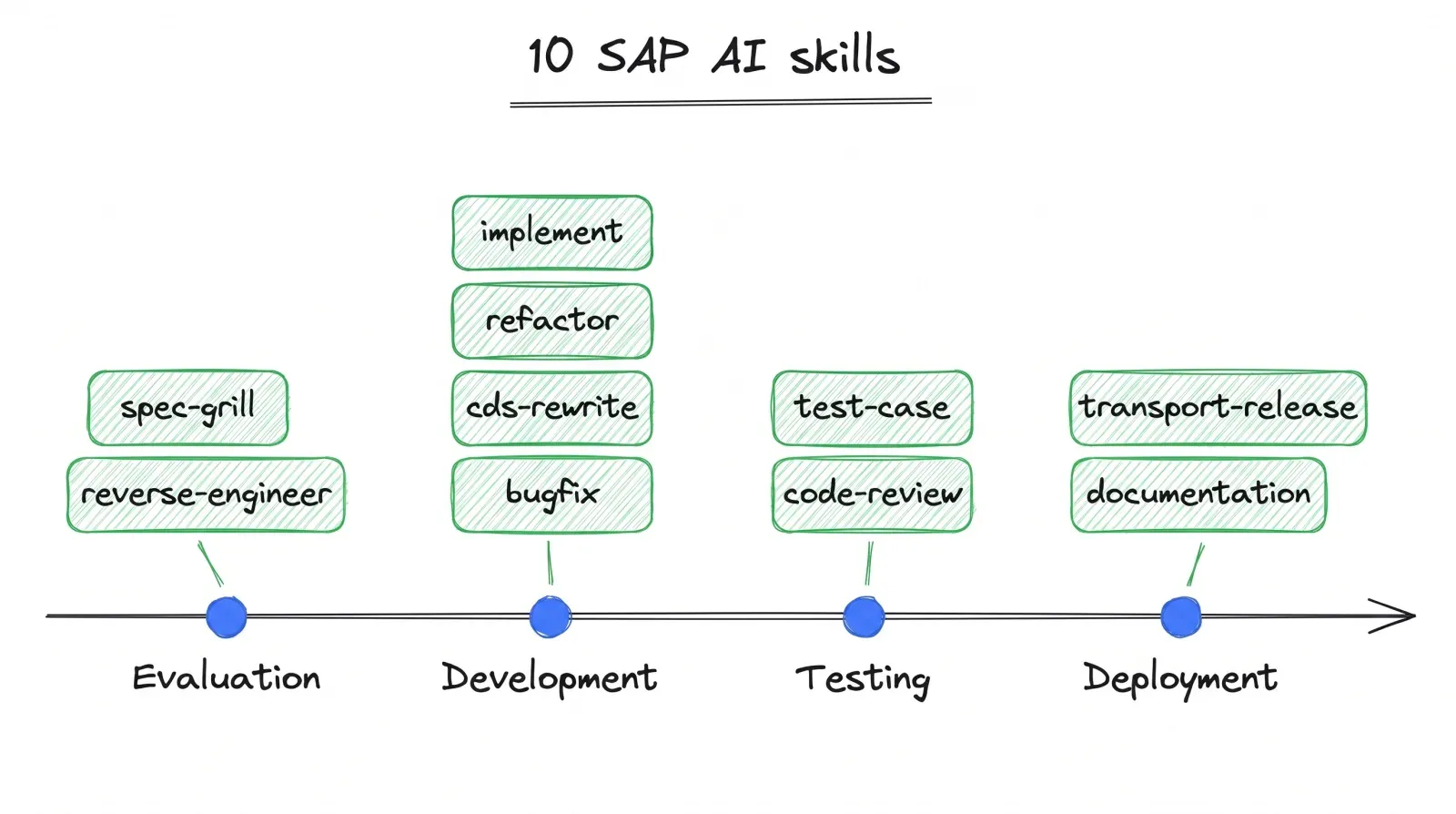
An AI SDLC for SAP has one skill per stage of a change, from the Jira ticket to the transport. How much each skill does on its own depends on your score; the result spells out every skill step by step for your setup. All ten are free and open source as a Claude Code plugin and GitHub Copilot prompt files: github.com/marian-kamenistak/sap-ai-skills.
- 1Specify
spec-grillJira ticket to a specification scored 8/10+ - 2Understand
reverse-engineerHow the existing code works - 3Build
implementCode, activation, checks - 4Test
test-caseABAP Unit and QAS scenarios - 5Review
code-reviewATC plus Clean ABAP and risks - 6Improve
refactorCleaner code, same behaviour - 7Modernize
cds-rewriteData logic moved into CDS views - 8Document
documentationDocs for Confluence or Jira - 9Release
transport-releaseTransport, QAS and PRD checklist - 10Run and fix
bugfixDump to cause to fix, back to Specify
Toolsets · checked 10 Nov 2026
8 AI toolsets for SAP teams
Your release, your IDE and your security rules decide which setup fits. Each drawing shows how the tools connect, from the developer to the DEV system. The first one gives AI the most of the cycle; the last one works when MCP is not allowed yet.
Not sure which one is yours? The test picks it from your answers.
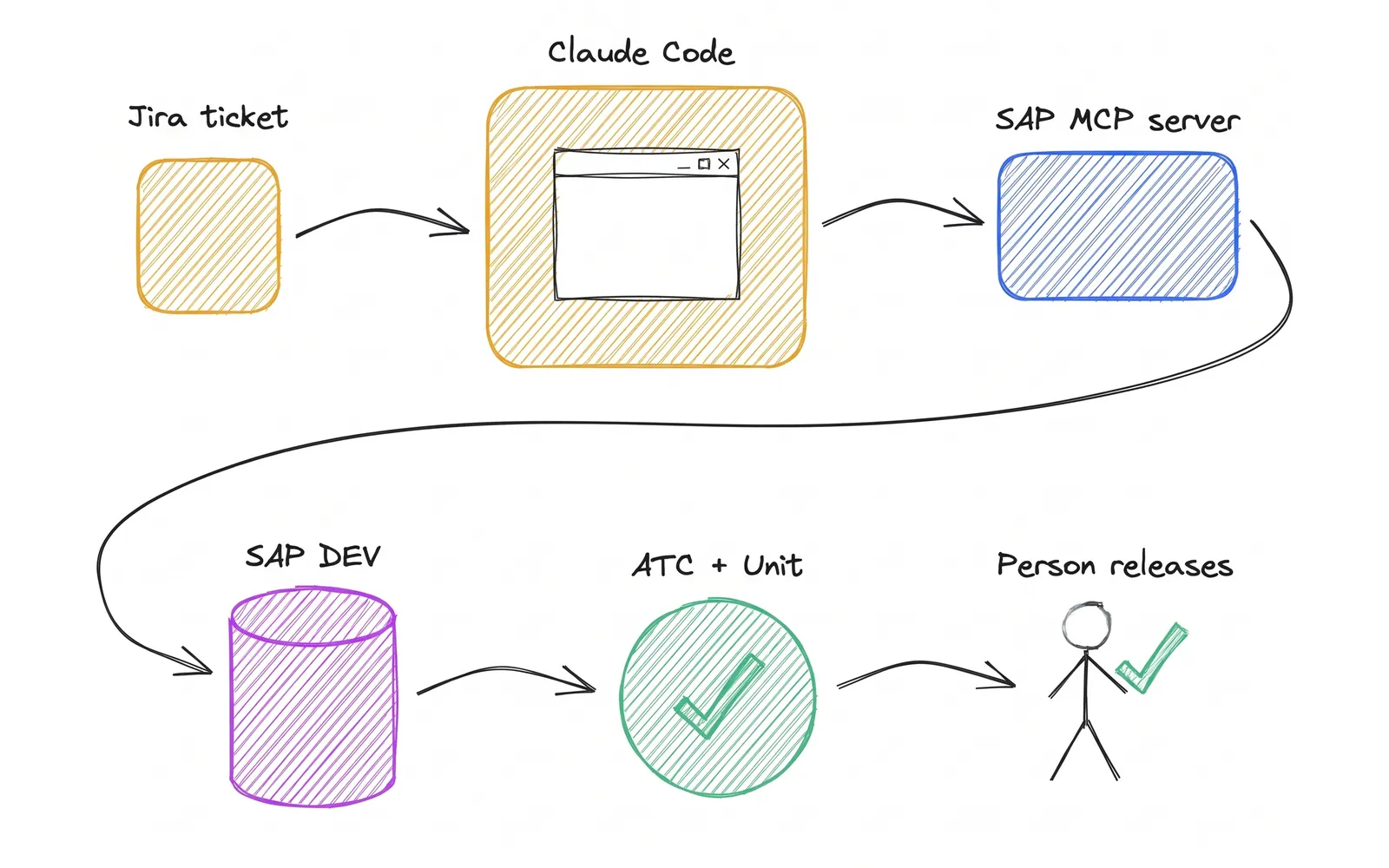
The full stack
Most of the cycle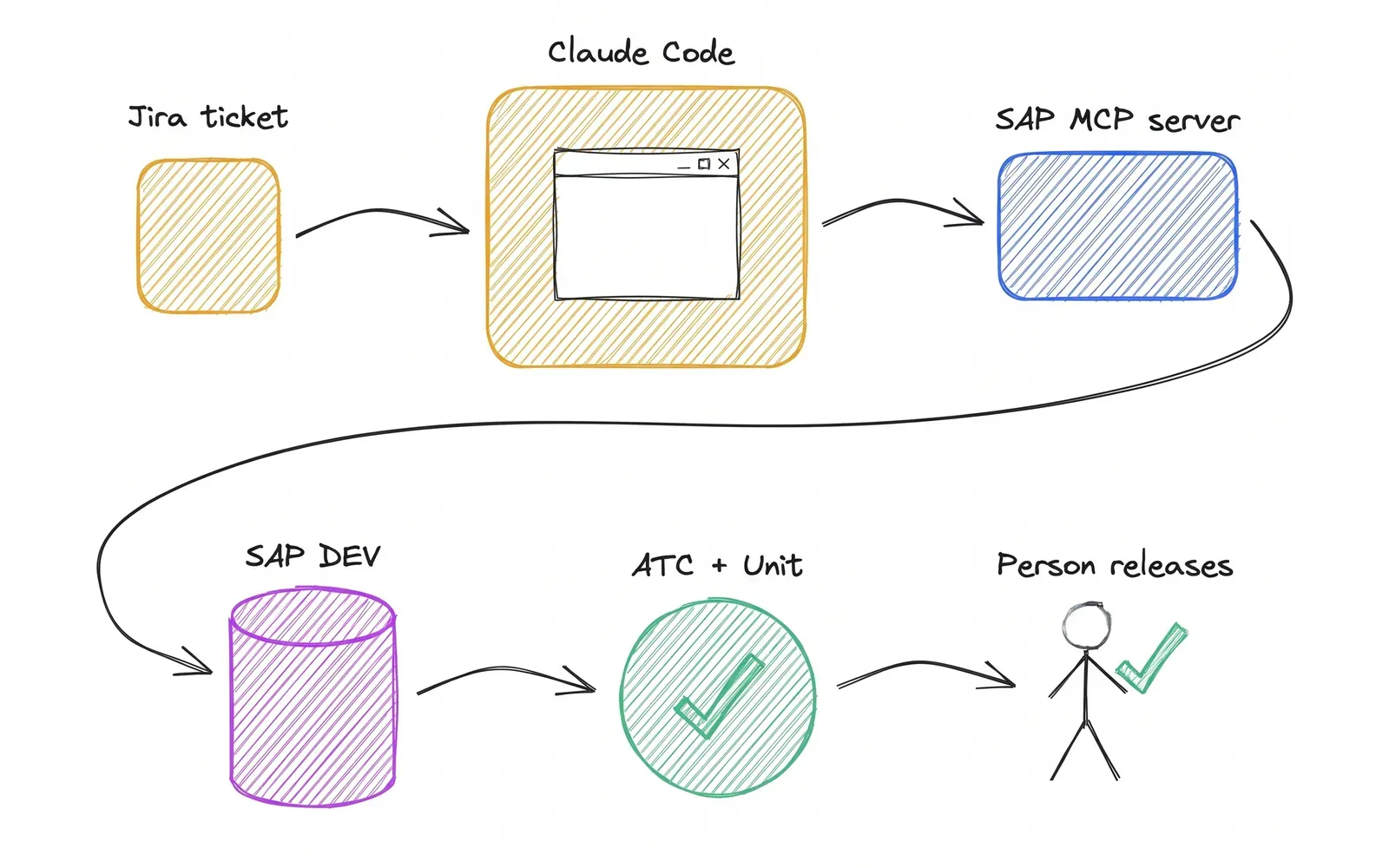
Step by step
- Jira ticketmcp-atlassian, read onlyMCP
- Claude Code + 10 SAP AI skillsin the Eclipse terminalMCP, localhost
- SAP ADT MCP server + arc1ADT 3.62+, arc1 adds where-usedADT
- SAP DEVAI writes only to one Z packageruns
- ATC + ABAP UnitAI fixes the code from the resultshands over
- A person releases the transportQAS and PRD follow your process
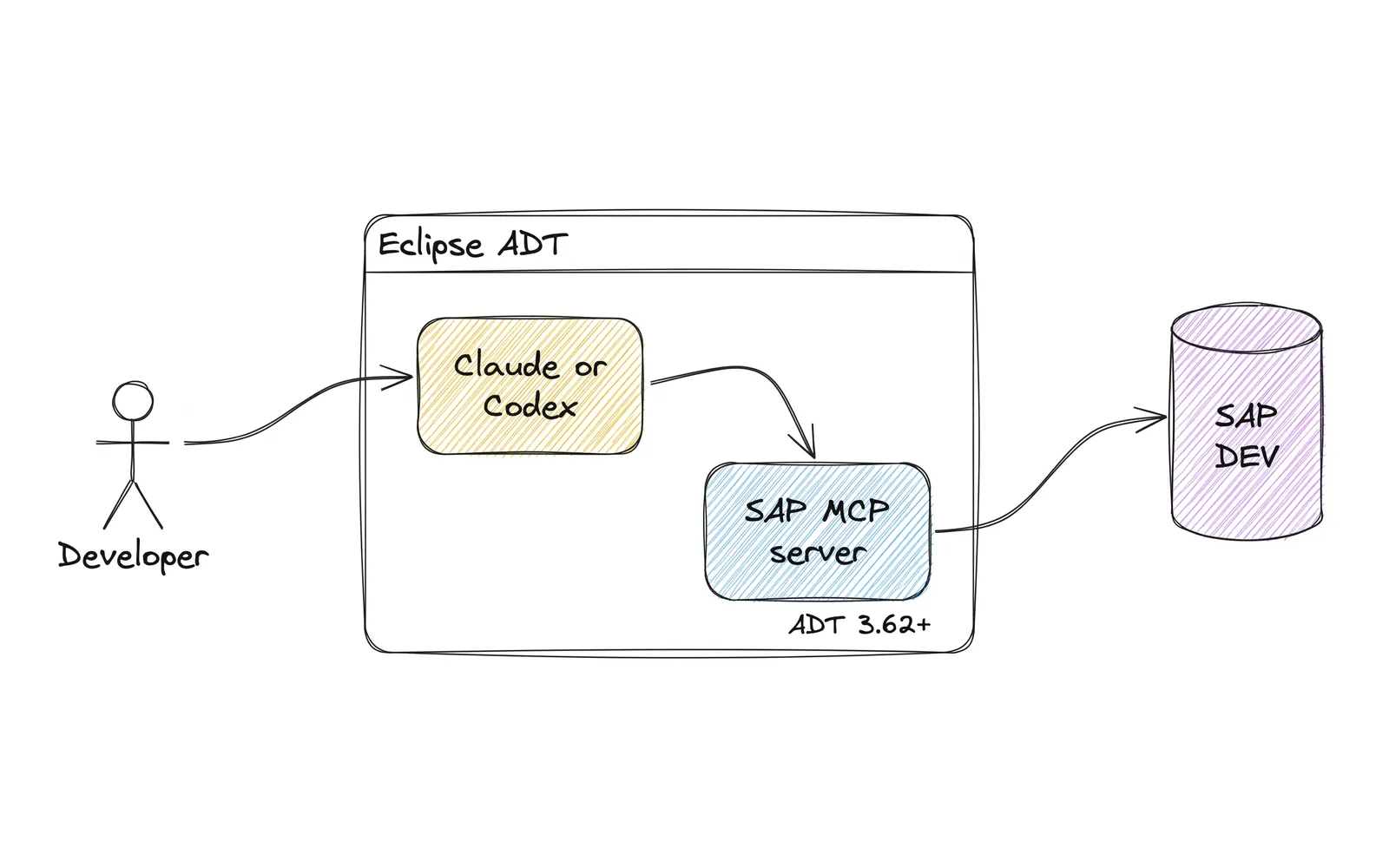
Claude Code or Codex in Eclipse
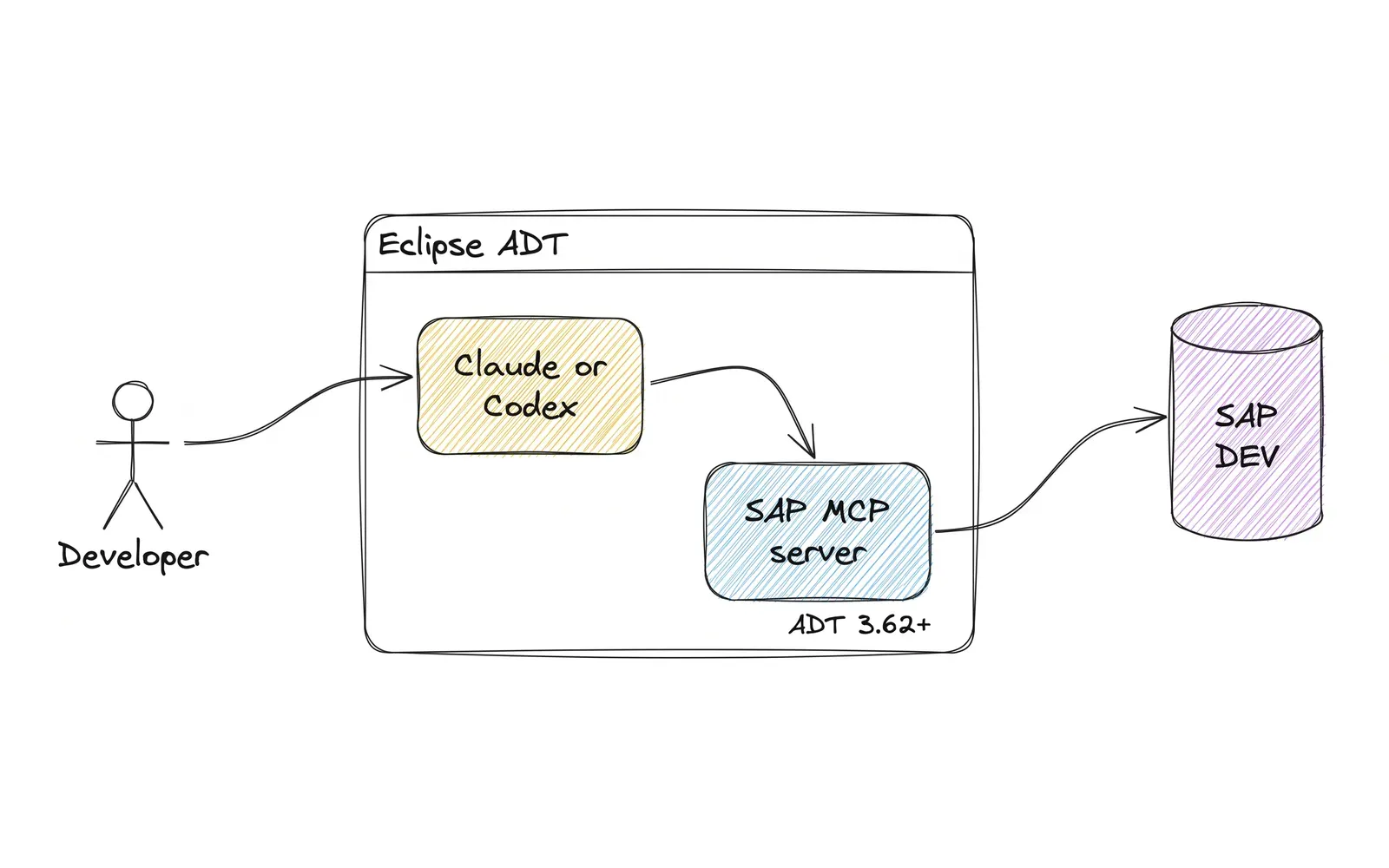
Step by step
- Developerprompt
- Claude Code or Codexin the Eclipse terminalMCP, localhost
- SAP ADT MCP serverADT 3.62+, Edit File tool onADT
- SAP DEVAI writes only to one Z package
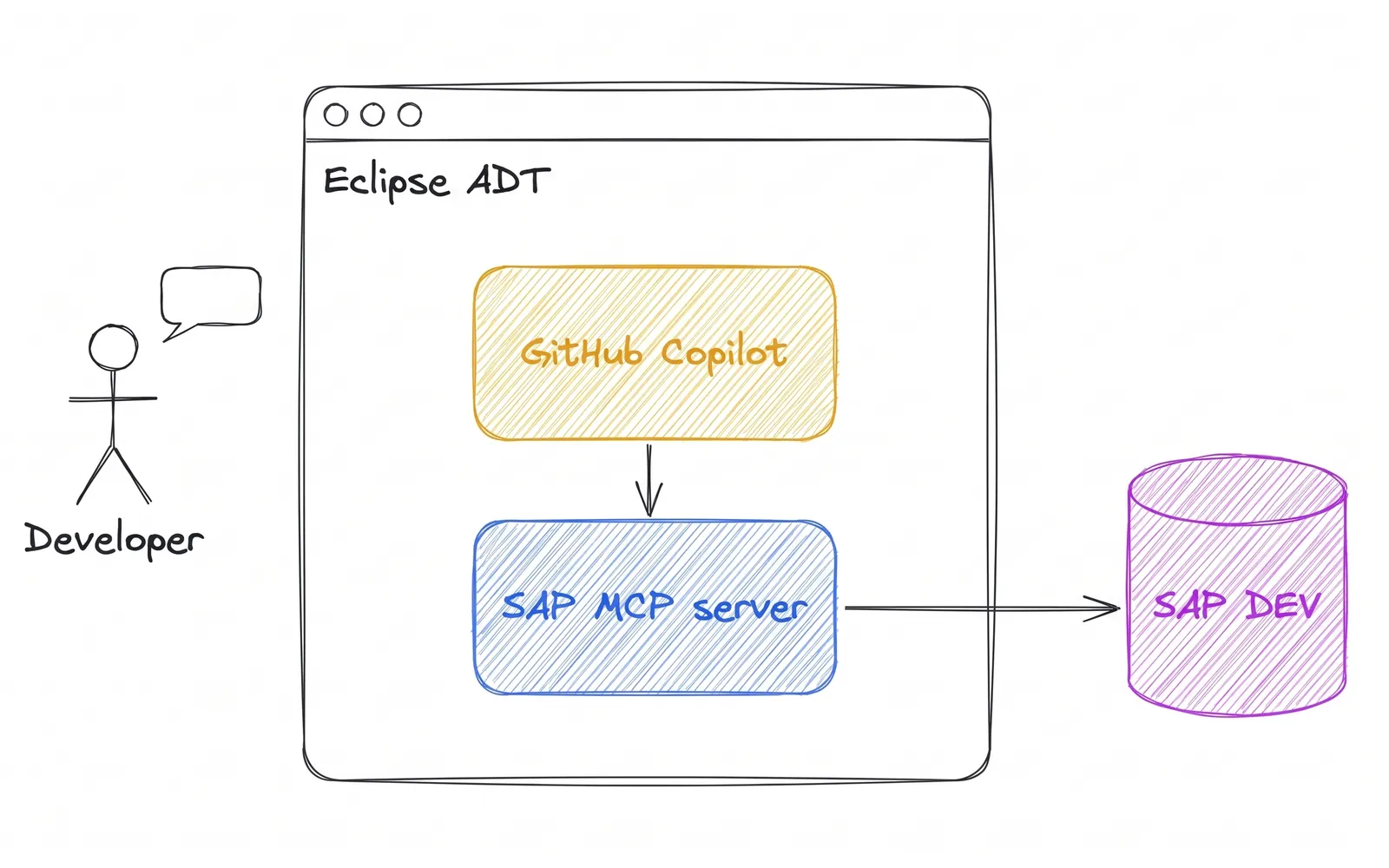
GitHub Copilot inside Eclipse
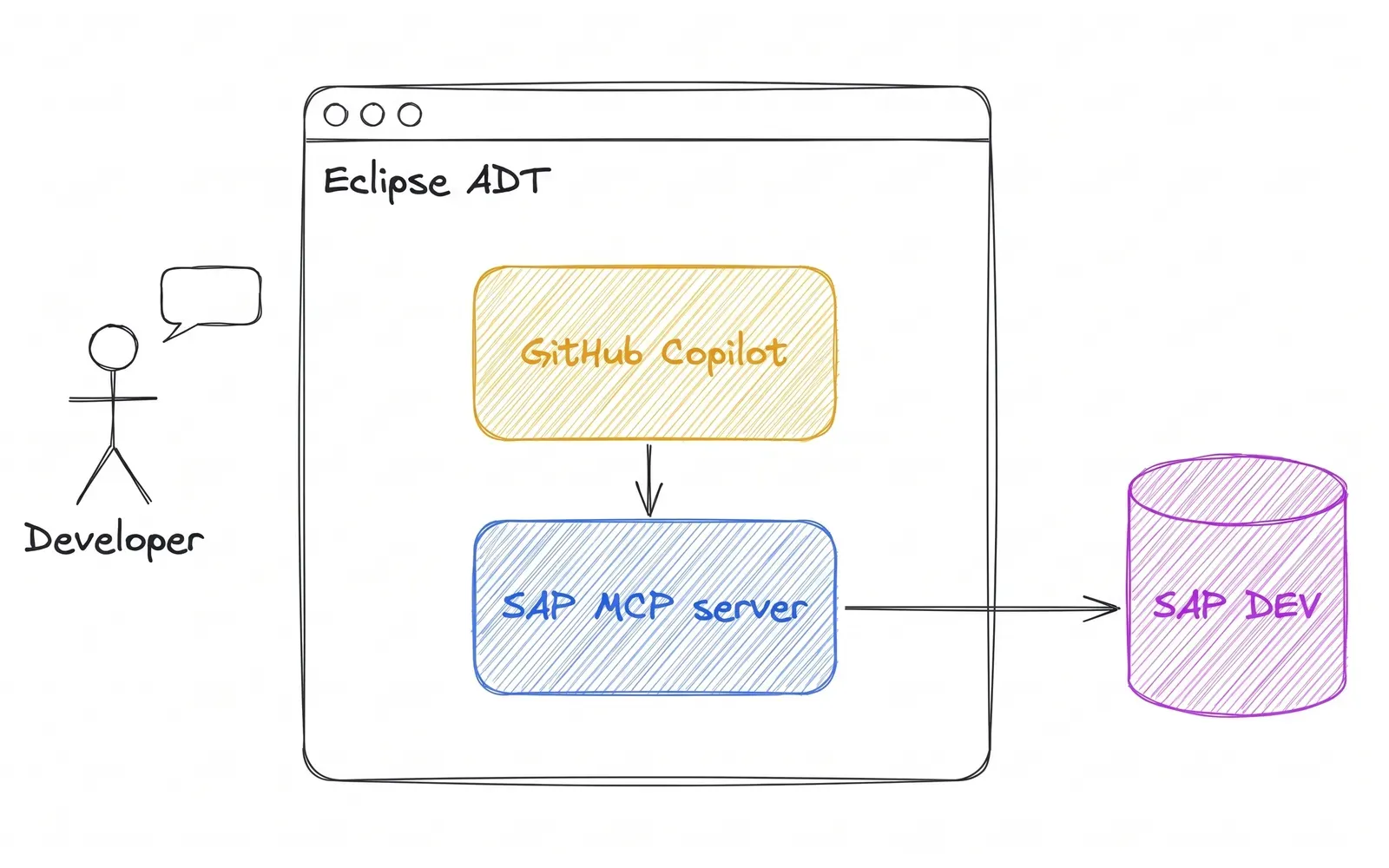
Step by step
- Developerchat
- GitHub Copilot, agent modeinside Eclipse ADTMCP
- SAP ADT MCP serverMCP allowed by a GitHub org adminADT
- SAP DEVAI writes only to one Z package
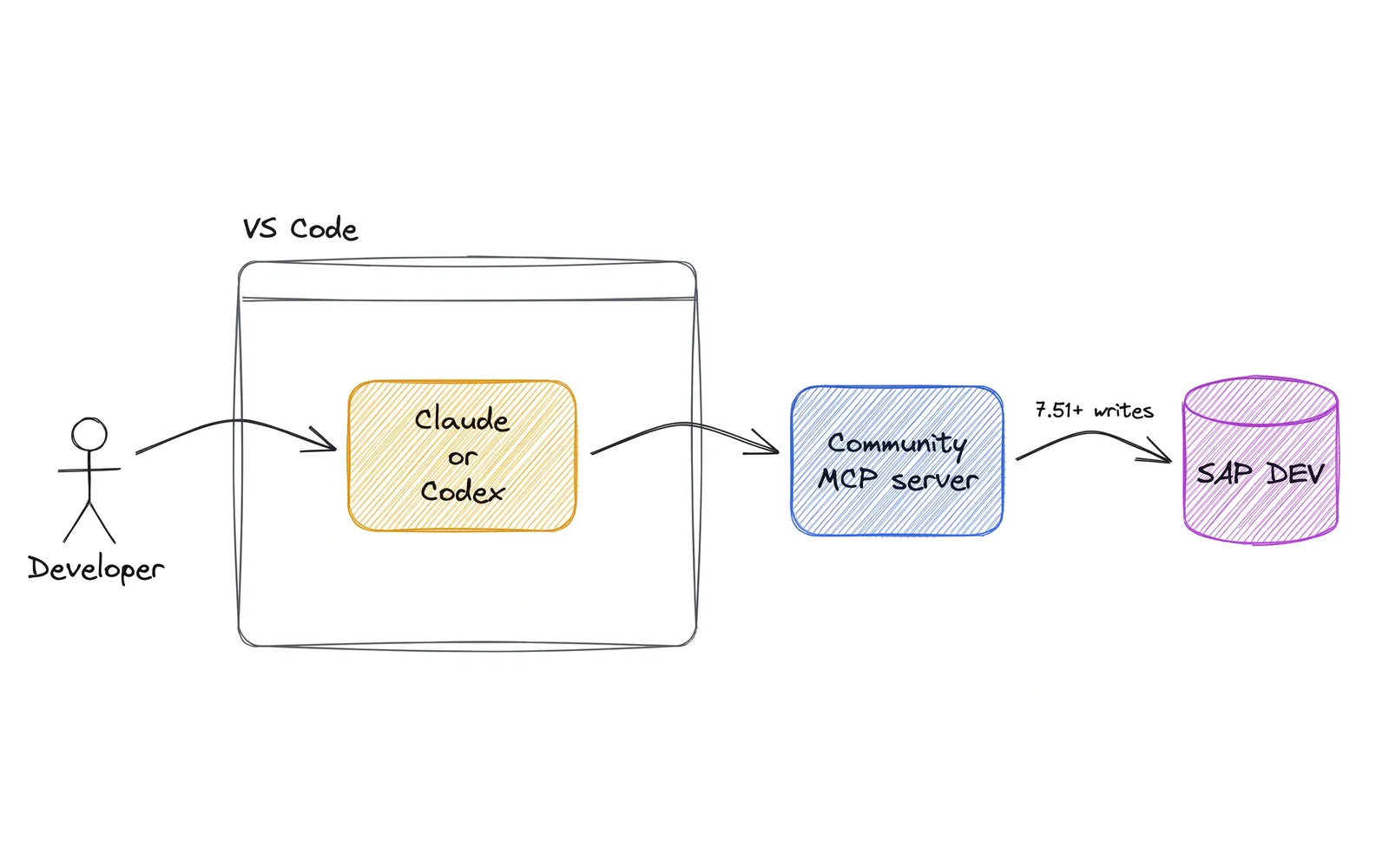
Community MCP server, no Eclipse
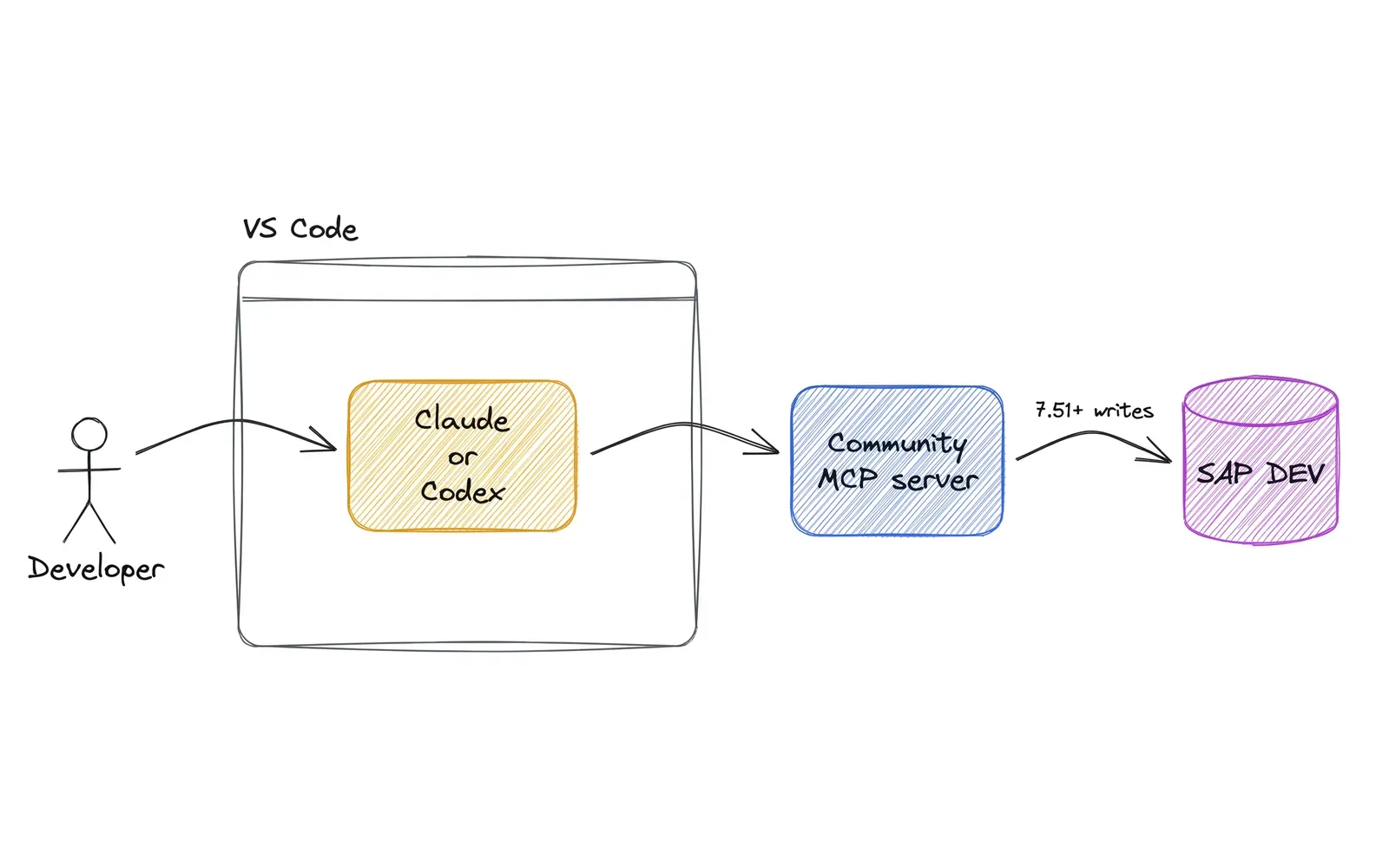
Step by step
- Developerprompt
- Claude Code or Codexin a terminal or VS CodeMCP
- Community MCP server on the laptopvibing-steampunk or mcp-abap-adtHTTPS, /sap/bc/adt
- SAP DEVthe developer's own SAP user
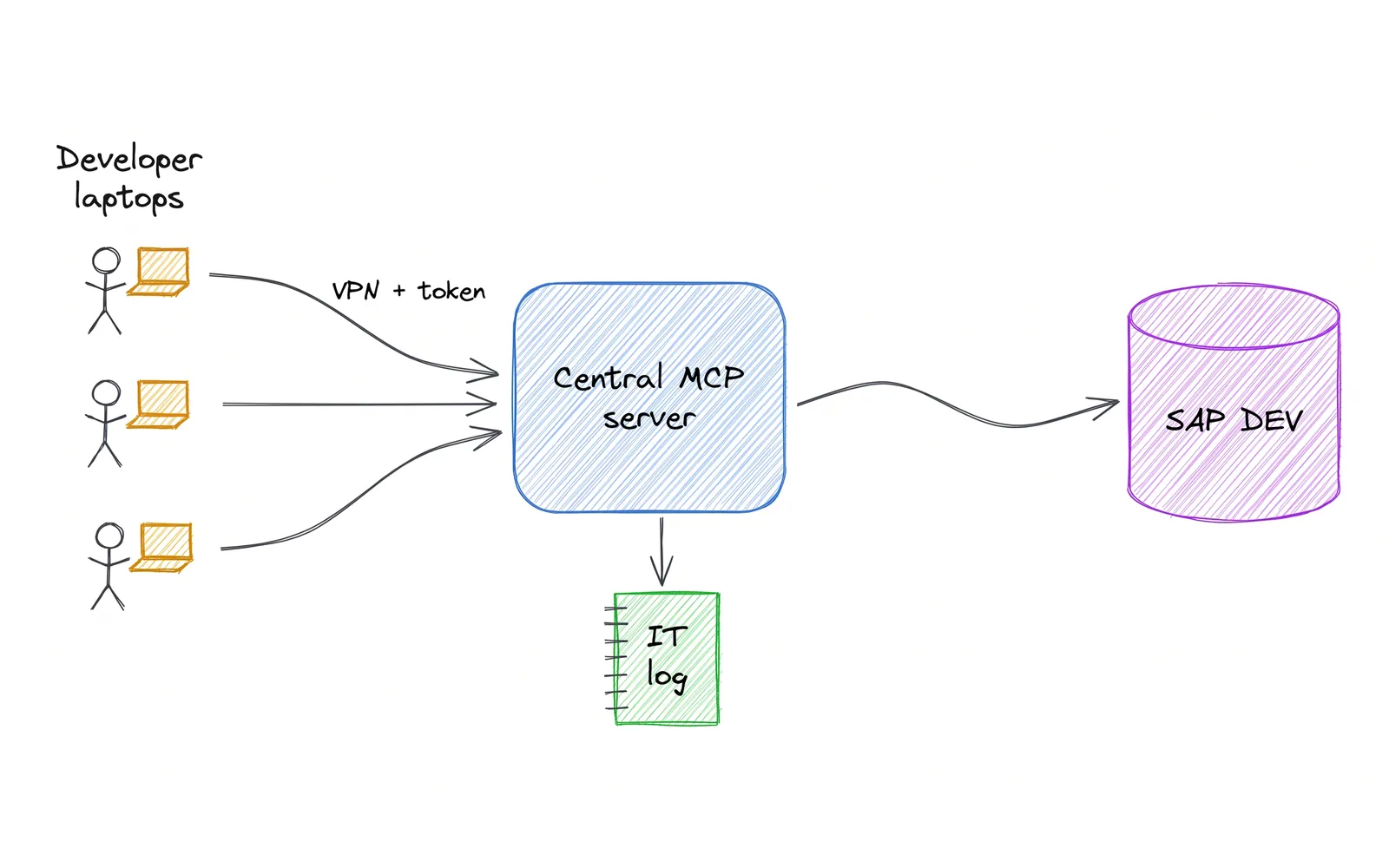
Central MCP server, run by IT
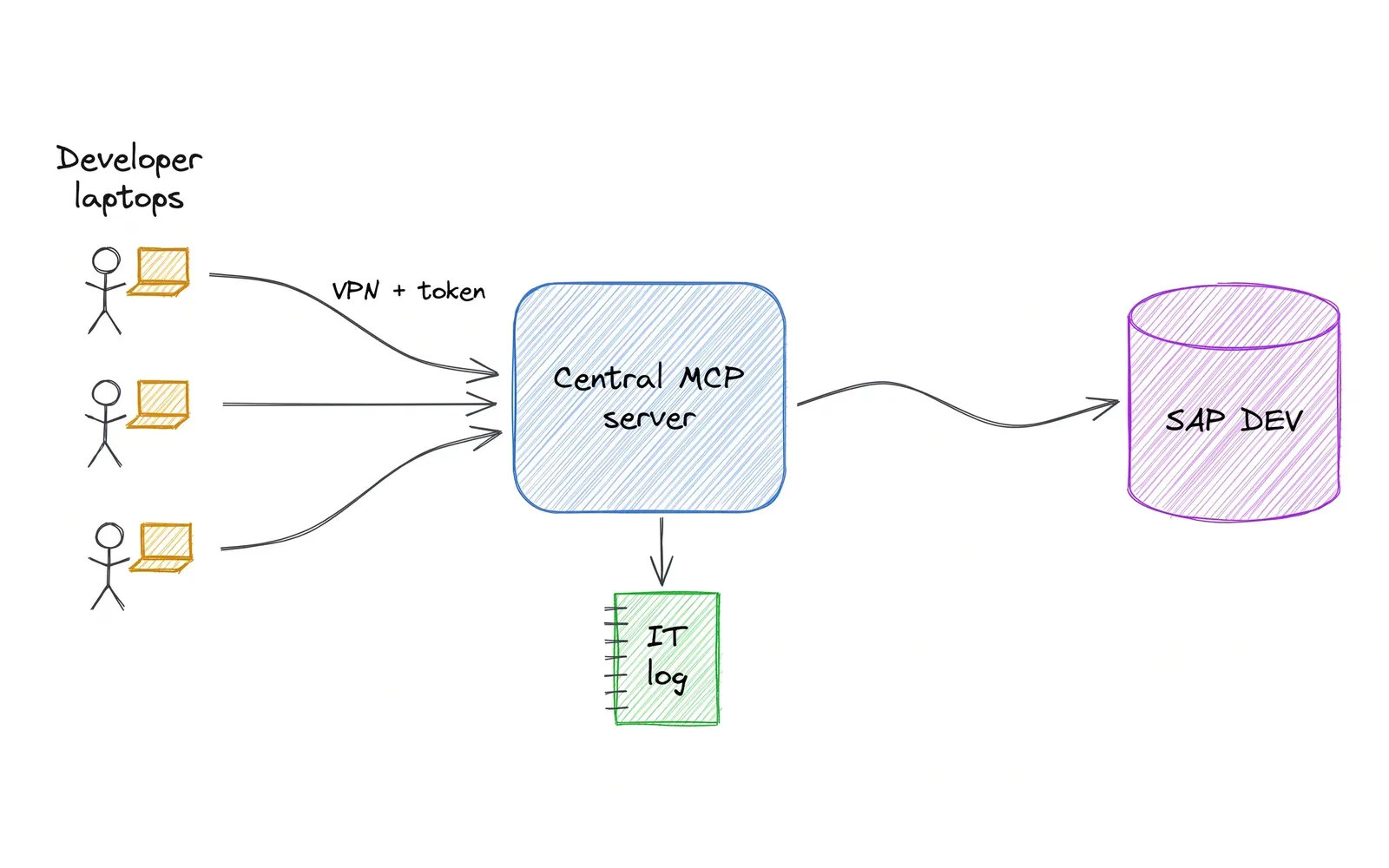
Step by step
- Claude Code, Codex or Copiloton each developer laptopVPN, personal token
- One MCP server in your networkIT chooses the tools and keeps the logADT
- SAP DEVwrites only where IT allows
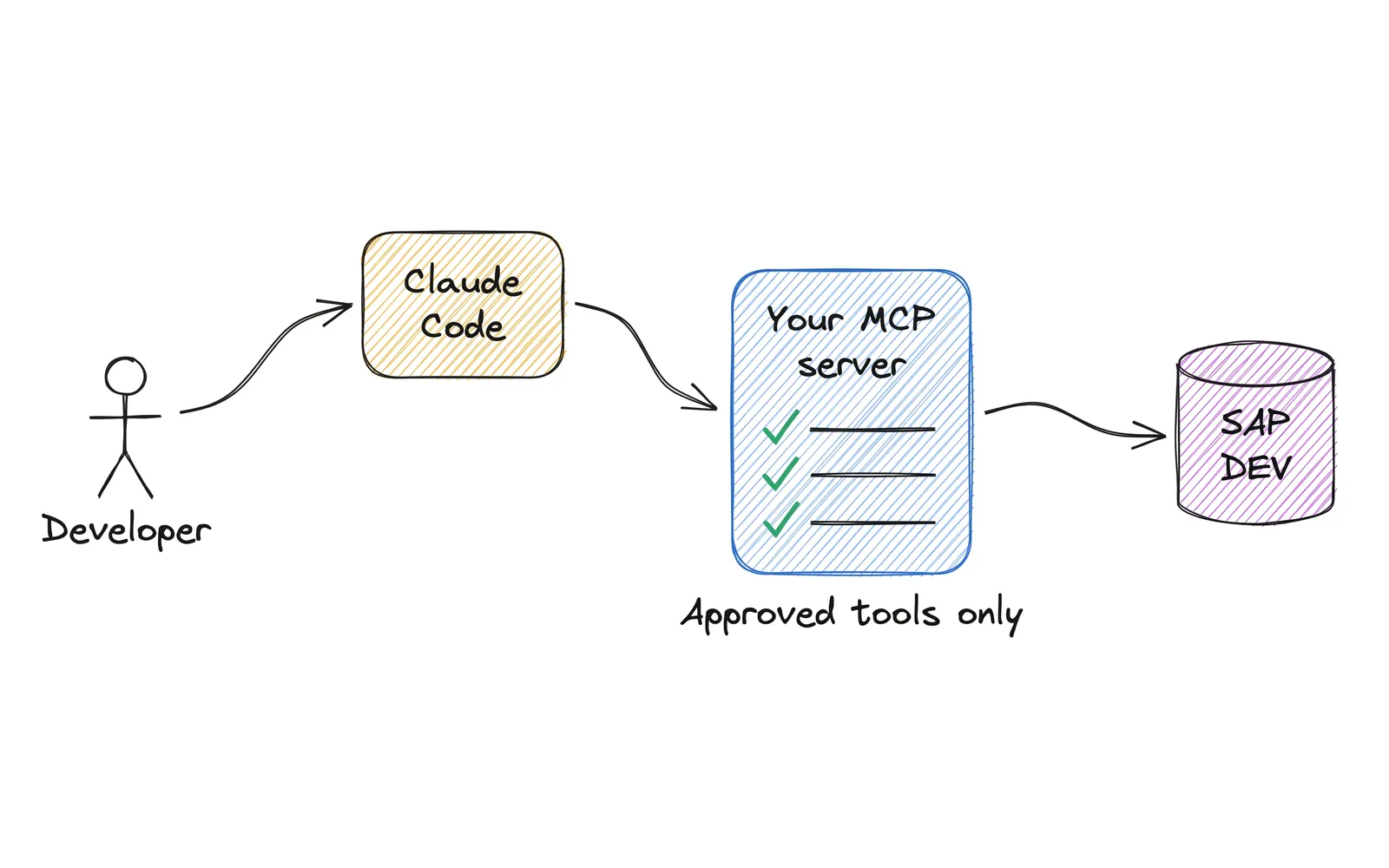
Your own small MCP server
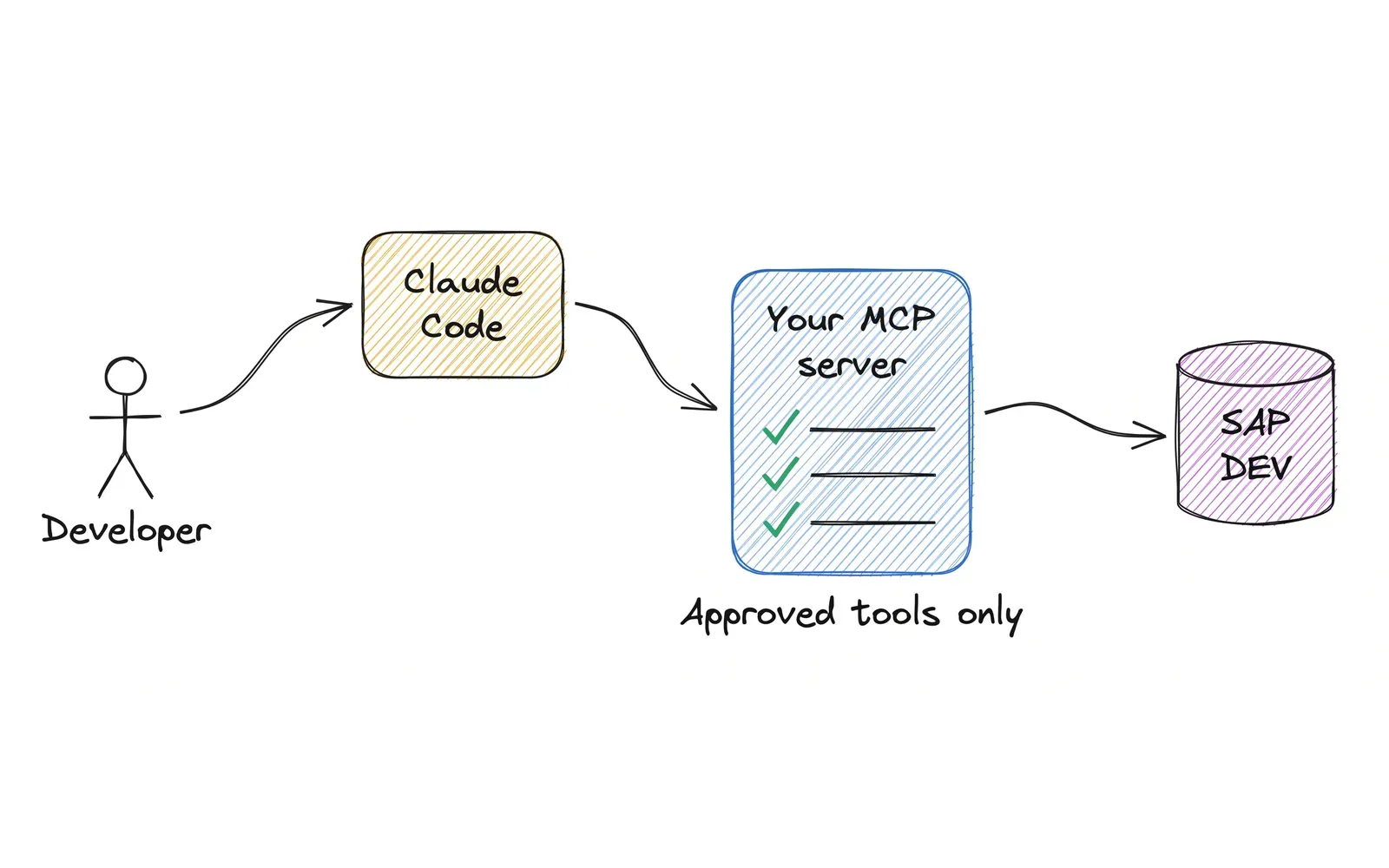
Step by step
- Developerprompt
- Claude CodeMCP
- Your MCP serveronly the tools you approveADT
- SAP DEVAI writes only to one Z package
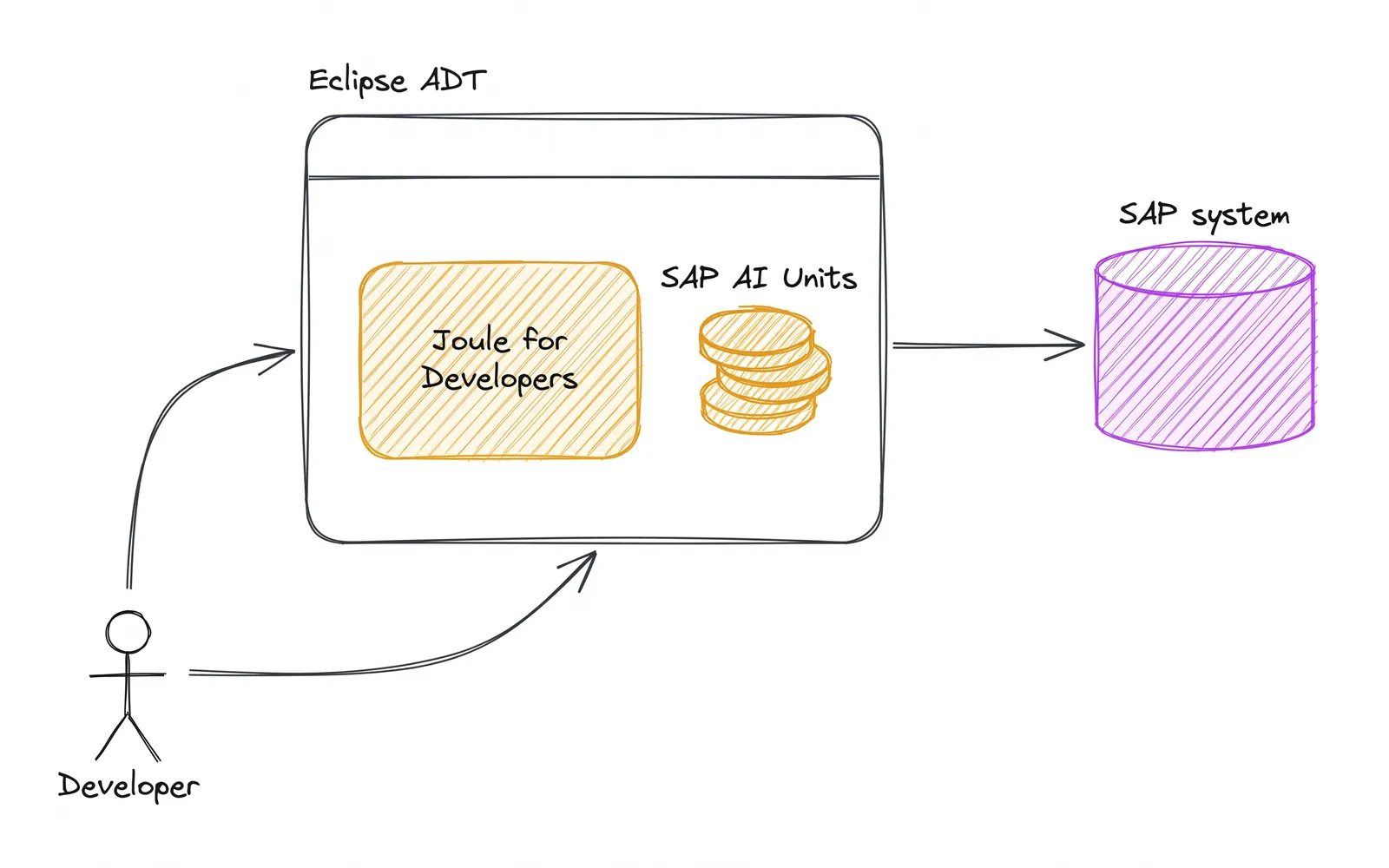
SAP's own: Joule for Developers
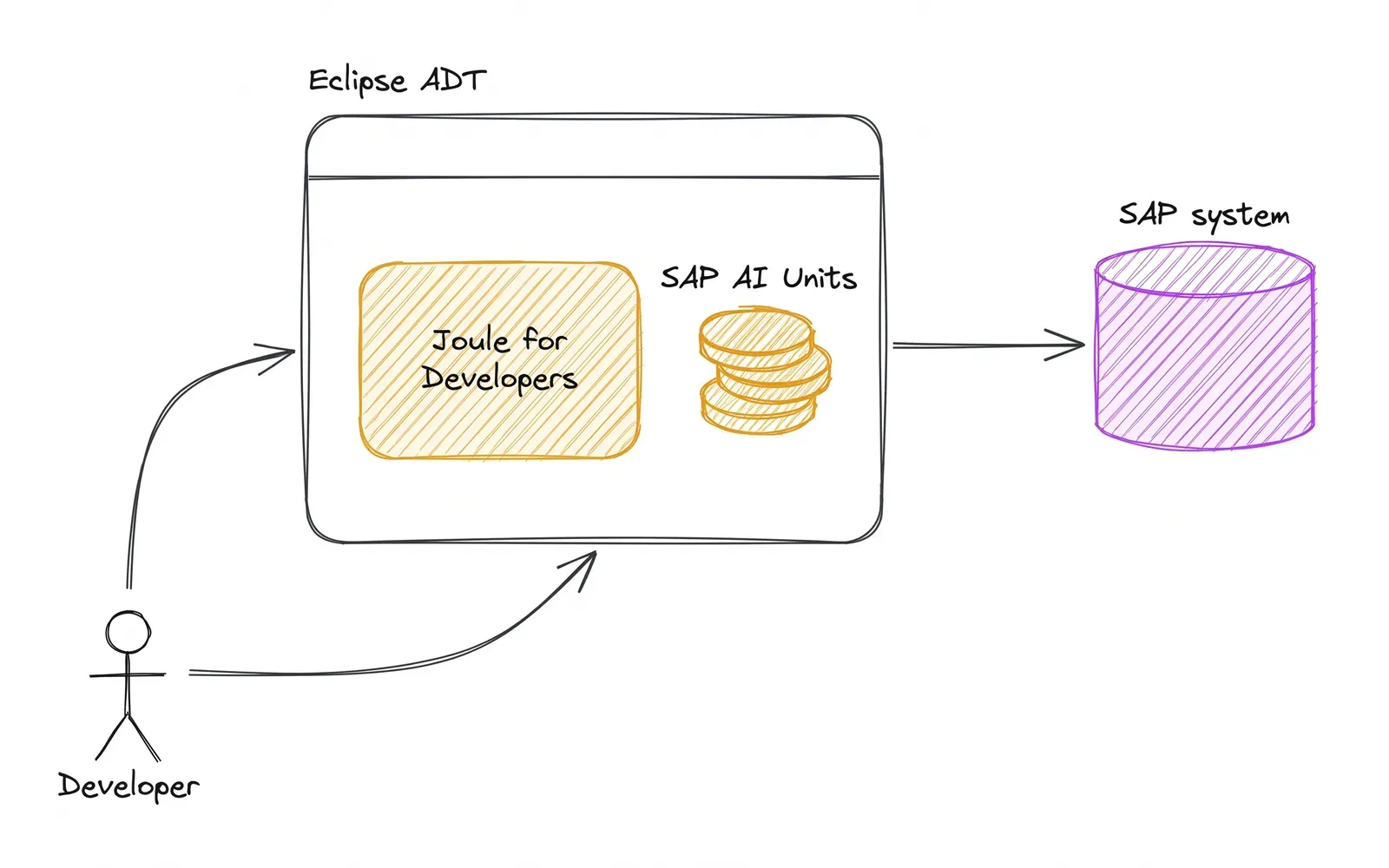
Step by step
- Developerasks
- Joule for Developersinside ADT: completion, explanation, unit testspaid in SAP AI Units
- SAP systemSAP supports the MCP tools with this licence
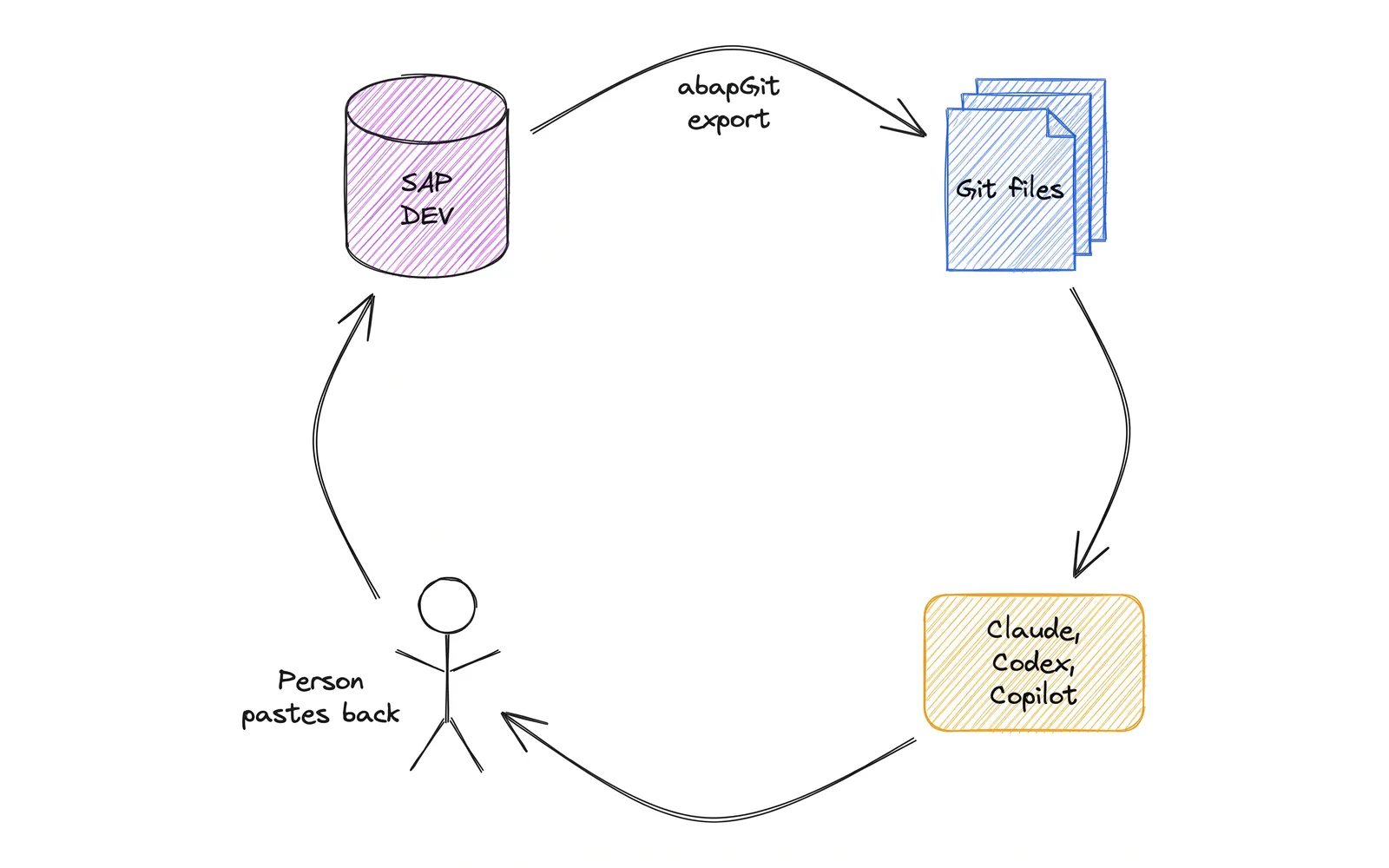
No MCP yet: abapGit files
Start here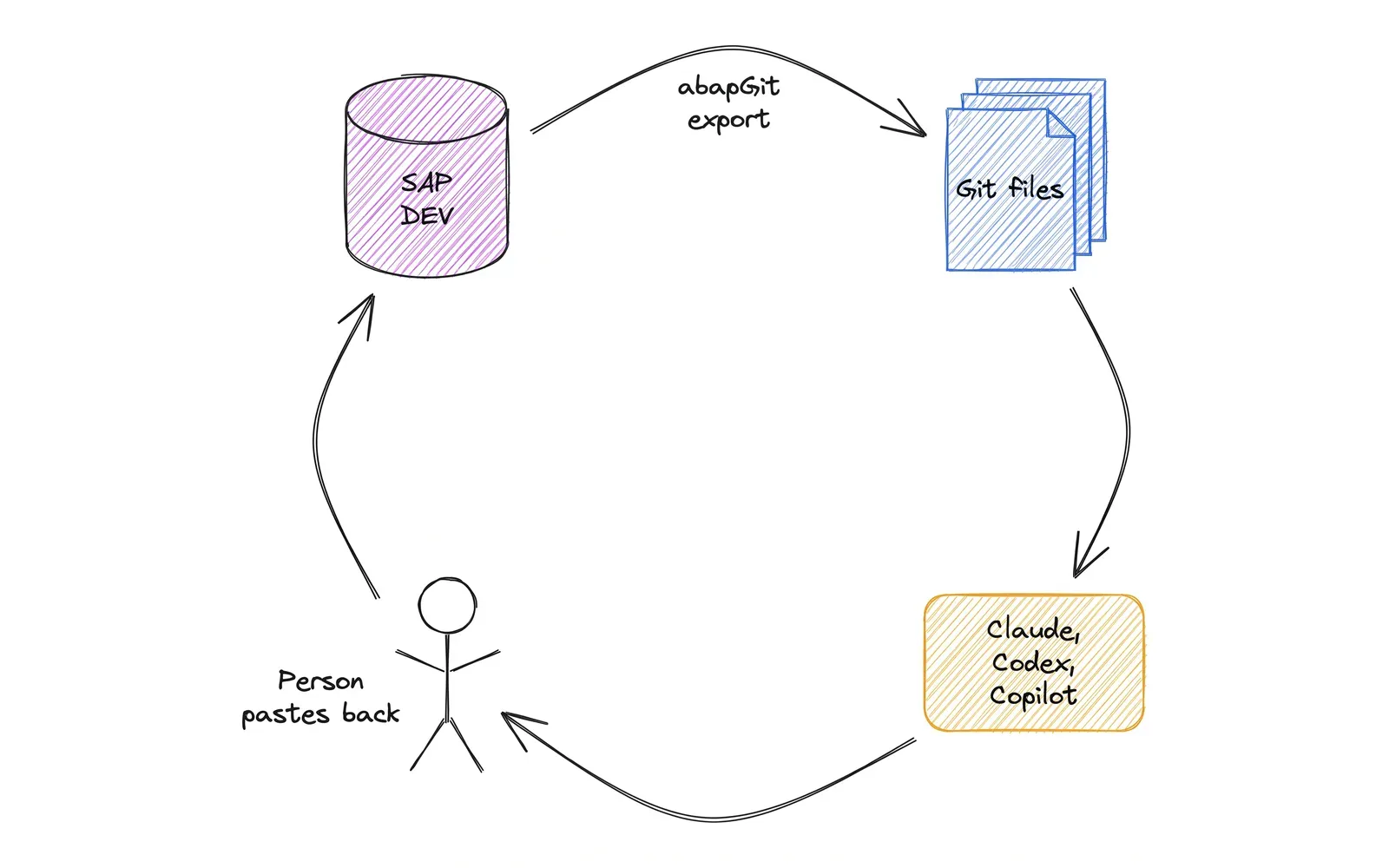
Step by step
- SAP DEVabapGit export
- Files in a Git repositoryreads files
- Claude Code, Codex or Copilotin VS Codea person pastes it back
- SAP DEVa person runs ATC and the tests
Tool list · checked 10 Nov 2026
Tools for an AI SDLC in SAP
What SAP teams use to run each step of the SDLC with AI, from the Jira ticket to production. Every link was checked on 10 November 2026.
| Logo | Tool | Type | What it does and where it helps | Link |
|---|---|---|---|---|
| Official SAP tools 13 | ||||
 | ABAP Development Tools (ADT) for Eclipse | Official | SAP's Eclipse IDE for ABAP, where developers write, debug and transport code. It also runs SAP's MCP server. SDLC step: Development | tools.hana.ondemand.com |
| ADT for VS Code | Official | SAP's free ABAP extension for VS Code with the MCP server built in. It covers fewer object types than Eclipse so far. SDLC step: Development | marketplace.visualstudio.com |
| SAP ADT MCP server | Official | Lets an AI agent search, read, edit, test and transport ABAP through ADT, and read short dumps. From ADT 3.62 it reads and edits source for Claude Code too, and writes only to packages on its allow-list. SAP states support from release 7.31 SP04, ECC included. SDLC step: DevelopmentTestingDeploymentProduction | help.sap.com |
| Joule for Developers, ABAP AI | Official | SAP's AI assistant inside ADT: code completion, code explanation and ABAP Unit test generation. Paid in SAP AI Units. SDLC step: DevelopmentTesting | help.sap.com |
| SAP-ABAP-1 (generative AI hub) | Official | SAP's own ABAP model in the generative AI hub, tuned mainly to explain existing ABAP code. SDLC step: Evaluation | help.sap.com |
| gCTS (Git-enabled CTS) | Official | Keeps ABAP changes in Git and moves them between systems, so each AI-made change has a history you can review. SDLC step: Deployment | help.sap.com |
| ABAP Test Cockpit (ATC) | Official | SAP's built-in quality checks for ABAP. Run them on AI-written code before the transport is released. SDLC step: TestingDeployment | help.sap.com |
| ABAP Unit | Official | The unit test framework built into ABAP. The AI writes the tests, ABAP Unit shows whether the code does what the ticket asked. SDLC step: Testing | help.sap.com |
| ABAP Cleaner | Open source (SAP) | Applies 100+ cleanup rules with one keystroke in Eclipse or VS Code. Tidies AI-written code before review. SDLC step: Development | github.com/SAP/abap-cleaner |
| Clean ABAP style guide | Open source (SAP) | SAP's style guide for ABAP. Turn it into the rules file your AI agent reads before it writes code. SDLC step: Development | github.com/SAP/styleguides |
 | CAP MCP server | Open source (SAP) | Lets an AI agent search your CAP model and the CAP documentation while it builds the service. SDLC step: Development | github.com/cap-js/mcp-server |
 | UI5 MCP server | Open source (SAP) | Gives an AI agent the UI5 API reference, UI5 guidelines and manifest checks when it builds a UI5 app. SDLC step: Development | github.com/UI5/mcp-server |
| Fiori MCP server | Open source (SAP) | Helps an AI agent create and change SAP Fiori elements apps from a prompt. SDLC step: Development | github.com/SAP/open-ux-tools |
| AI coding assistants 4 | ||||
 | Claude Code | Commercial | Anthropic's AI coding agent for the terminal and VS Code. For ABAP it connects to SAP's MCP server or a community one. SDLC step: EvaluationDevelopmentTesting | code.claude.com |
 | GitHub Copilot for Eclipse | Commercial | Copilot inside Eclipse ADT: ABAP completion, chat, and agent mode with MCP. Agent edits on ABAP files still have open bugs. SDLC step: Development | marketplace.eclipse.org |
 | Claude Code for Eclipse (unofficial) | Community | Unofficial plugin that brings Claude Code into Eclipse. It does not see open ADT editors yet. SDLC step: Development | github.com/eilonwy06/claudecode-eclipse-ide |
 | Nova Intelligence | Commercial | An agentic platform for SAP. It reads the custom code, processes and integrations, keeps the documentation current, and writes and tests code changes in the system. SDLC step: EvaluationDevelopmentTesting | novaintelligence.com |
| MCP servers and plugins 12 | ||||
 | arc1 ADT MCP extension | Community | Adds read-only tools to SAP's ADT MCP server in Eclipse: where-used, package contents, the inactive-objects list, and source reading on ADT 3.60 and 3.61. Block its arc1_sap_http_post tool, which can post to any ADT endpoint. SDLC step: EvaluationDevelopment | github.com/arc-mcp/arc1-adt-abap-mcp-ext |
 | vibing-steampunk | Community | Bridges ADT to MCP: read code, debug, run tests and read dumps. Writes need 7.51 or newer, or a small extension installed on the SAP side. SDLC step: DevelopmentTestingProduction | github.com/oisee/vibing-steampunk |
 | mcp-abap-adt (mario-andreschak) | Community | Sixteen read-only tools for ABAP code, DDIC and table contents. A low-risk first step, though table reads send business data to the model. SDLC step: Evaluation | github.com/mario-andreschak/mcp-abap-adt |
| mcp-abap-abap-adt-api | Community | Over 120 ADT tools in one server: edit, activate, transport, debug and refactor ABAP from an AI agent. SDLC step: DevelopmentDeployment | github.com/mario-andreschak/mcp-abap-abap-adt-api |
 | mcp-abap-adt (fr0ster) | Community | Create, read, change and delete ABAP objects on ECC, S/4HANA and BTP ABAP Cloud. Needs BASIS 7.50 or newer. SDLC step: Development | github.com/fr0ster/mcp-abap-adt |
 | abap-adt-mcp (williansaez) | Community | Read and write source, run unit tests and ATC, manage transports and read dumps, with guard rails set per system on the server. SDLC step: DevelopmentTestingProduction | github.com/williansaez/abap-adt-mcp |
 | ABAP FS (vscode_abap_remote_fs) | Community | VS Code extension that opens an ABAP system as files. It has AI tools for Copilot and an MCP server for Claude Code and other agents. SDLC step: DevelopmentTesting | github.com/marcellourbani/vscode_abap_remote_fs |
 | mcp-sap-docs | Community | Gives an AI agent search over SAP Help and the ABAP keyword documentation, so its answers rest on the docs. SDLC step: EvaluationDevelopment | github.com/marianfoo/mcp-sap-docs |
| SAP AI MCP servers (index) | Community | A list of SAP MCP servers and SAP AI skills, kept up to date by the community. Start here to find more. SDLC step: Evaluation | github.com/marianfoo/sap-ai-mcp-servers |
 | bw-modeling-mcp | Community | Lets an AI agent read, create and change BW/4HANA objects such as aDSOs, transformations and DTPs. On BW 7.5 on HANA it reads transformations and DTPs only. SDLC step: Development | github.com/dnic-dev/bw-modeling-mcp |
 | mcp-sap-gui | Community | Lets an AI agent work in SAP GUI for Windows: read screens, fill in fields and run transactions. Saves wait for your approval. SDLC step: TestingProduction | github.com/kts982/mcp-sap-gui |
 | hana-cli MCP server | Open source (SAP) | SAP sample command line tool for HANA with an MCP server, so an agent can list tables and views and run queries. SDLC step: Development | sap-samples.github.io/hana-developer-cli-tool-example |
| Quality and code in files 6 | ||||
 | abapGit | Community | Exports ABAP to Git as plain files, so an AI agent can read whole packages and you get a diff to review. SDLC step: DevelopmentDeployment | github.com/abapGit/abapGit |
 | abaplint | Community | Static checks for ABAP in files that run in CI. A fast, repeatable gate on AI-written code. SDLC step: Testing | github.com/abaplint/abaplint |
 | SAP Enterprise Continuous Testing by Tricentis | Commercial | Codeless, model-based test automation for SAP and the apps around it. It generates test cases from a plain-language description, paid in SAP AI Units, and updates the tests when SAP changes. SDLC step: Testing | tricentis.com/sap/test-automation |
 | Panaya | Commercial | Shows what a change affects in custom code, transports and business processes. An agent fixes ABAP custom code with a person in the loop, and every fix is tested before go-live. SDLC step: DevelopmentTestingDeployment | panaya.com/sap |
 | Worksoft | Commercial | Codeless automation that tests SAP business processes end to end, in SAP GUI, Fiori and the systems around them. Worksoft Impact uses SAP change and usage data to pick the tests a change needs. SDLC step: TestingDeployment | worksoft.com/applications/sap |
 | Int4 Suite | Commercial | Test agents for SAP Integration Suite. You describe a test in plain language, and the agent runs it with real messages captured from production. SDLC step: Testing | int4.com/products/suite |
| Backlog and specs 4 | ||||
 | mcp-atlassian | Community | Connects an AI agent to Jira and Confluence, Cloud or Server/Data Center, so it reads the ticket and the spec. SDLC step: Evaluation | github.com/sooperset/mcp-atlassian |
 | calmcp | Community | Connects an AI agent to SAP Cloud ALM: requirements, user stories, defects, test cases and analytics. It only reads until you switch writing on. SDLC step: EvaluationTesting | github.com/consetto/calmcp |
 | Atlassian Rovo MCP server | Commercial | Atlassian's hosted MCP server for Jira and Confluence Cloud. The agent reads tickets and writes specs and pages. SDLC step: Evaluation | atlassian.com/platform/rovo-mcp |
 | Azure DevOps MCP server | Commercial | Microsoft's MCP server for Azure DevOps: work items, wiki, test plans, repos and pipelines. SDLC step: EvaluationTestingDeployment | github.com/microsoft/azure-devops-mcp |
| Skills 1 | ||||
 | SAP AI skills | Community | 10 skills that take an ABAP change from a Jira ticket to a released transport, for Claude Code and GitHub Copilot. People approve the spec, the diff and the transport. SDLC step: EvaluationDevelopmentTestingDeployment | github.com/marian-kamenistak/sap-ai-skills |
SAP AI workshop
Set it up with your team in one day
The AI for SAP teams workshop runs on your own code and backlog: up to 12 people for 2,400 EUR, or the whole IT team of up to 50 for 3,900 EUR, excluding VAT. It starts from files and moves to the ABAP MCP server where your IT approves it. The case behind it is an 18-person SAP team that cut median implementation time from 19 days to about 5.5.
The sample deck of a workshop day, 73 slides: install guide, four group guides with the exact prompts, one slide on how each skill works.
Guides
Why AI in SAP ABAP needs an MCP server
Without MCP, AI sees only the snippet someone pastes into it. It doesn't know your Z tables, includes or naming rules, and it never learns whether the code passed the syntax check, so it writes textbook ABAP that doesn't fit your system. With an ABAP MCP server, AI reads the live code, asks the system for DDIC and where-used, runs the checks itself and fixes its code from the results. That loop is where the gap between 37% and 84% comes from, measured on 180 ABAP tasks in the TH Köln benchmark and its extended model leaderboard (Claude Opus 4.6, April 2026).
SAP's own MCP server, per SAP Help, runs inside Eclipse ABAP Development Tools 3.60 and newer, on localhost behind a token, and SAP states support down to release 7.31 SP04, on-premise included. From ADT 3.62 it reads and edits source for CLI clients such as Claude Code, and it writes only to the packages you put on its allow-list. Nothing is installed on SAP and AI works under the developer's own SAP user.
The best AI for ABAP: Claude Code or GitHub Copilot
Both connect to the same SAP server. GitHub Copilot for Eclipse runs inside ADT and reads ABAP through the IDE, and you can pick Claude models in it. Claude Code runs in the Eclipse terminal with your Claude licence. On ADT 3.62 or newer it reads and edits code through SAP's server too; on 3.60 and 3.61 it needs the community add-on arc1 to read and can't change existing objects through SAP's server. The test asks which one you use and builds the install guide for it.
When a local MCP server isn't allowed
- A central MCP server inside your network, behind the firewall and reached over VPN. IT gets one place for rules and logs. Chat connectors that run in the cloud can't reach it; Claude Code on the laptop can.
- Your own MCP server with only the tools you choose, for example read source, where-used, ATC and tests, and no table contents.
- No MCP. Export code to files with abapGit and let AI work on them. Reading, checks and moving code back stay manual, and the score stops around 4 out of 10.
Why rewrite ABAP reports to CDS views
Many Z reports still read data the old way: a SELECT, then a loop with more SELECTs inside, joins and totals built in ABAP. A CDS view moves that work into the database. The cds-rewrite skill does the move with AI and proves the result stays the same.
- Speed. HANA joins, filters and totals the data where it lives, so far less data travels to the ABAP server. Reports with SELECTs in loops are usually the biggest winners.
- One definition, many users. The same view feeds the ABAP report, a Fiori app, an OData API and analytics.
- Authorization in one place. A CDS access control declares who sees which rows once, instead of AUTHORITY-CHECKs scattered through programs.
- Testable. CDS views have their own test double framework, so the rewrite comes with tests that prove the output.
- Where SAP is going. RAP, ABAP Cloud and SAP's clean-core guidance all build on CDS views.
Not everything belongs in a view. Updates and complex procedural rules stay in ABAP, and a rewrite that doesn't make the report faster or simpler isn't worth shipping, which is why the skill measures runtime before and after. CDS view entities need release 7.55 or newer (S/4HANA 2020); from 7.40 SP05 to 7.54 the skill writes classic DDIC-based CDS views (DEFINE VIEW), and 7.31 has no CDS.
SAP and AI terms in plain English
For anyone answering the test who doesn't work in SAP every day. Each question in the test explains the terms it uses.
- Claude Code
- Anthropic’s coding agent. It runs in a terminal or VS Code, reads a whole project, runs commands and edits files. Included in Claude Team and Enterprise.
- GitHub Copilot
- GitHub’s coding assistant. It has an official Eclipse plugin with ABAP support and can use Claude, GPT and other models.
- MCP (Model Context Protocol)
- An open standard that lets an AI tool call tools in another system, such as “read this class” or “run the tests”. Without it, AI sees only what you paste.
- ADT MCP server
- SAP’s own MCP server, built into Eclipse ADT 3.60 and newer. From 3.62 it reads and edits source for CLI clients such as Claude Code, and writes only to the packages you allow. It runs on the developer’s laptop (localhost:2234) behind a token; SAP states support from release 7.31 SP04.
- ADT (ABAP Development Tools)
- SAP’s free plugin that turns Eclipse into the editor for ABAP. It is the modern way to develop on S/4HANA.
- SAP GUI and SE80
- SAP GUI is the classic desktop client for SAP. SE80 is its built-in development workbench, older than ADT.
- SAP HANA Studio
- An older Eclipse-based tool for HANA database work. SAP no longer develops it (SAP Note 2465027).
- Release (SAP_BASIS)
- The version of SAP’s technical platform, for example 7.50 or 7.58. It decides which language features and tools work.
- SICF and /sap/bc/adt
- SICF is the SAP transaction where web services are switched on and off. /sap/bc/adt is the group of services Eclipse ADT and every ADT-based MCP server use.
- Basis
- The SAP administration team: systems, users, settings and transport imports.
- Transport
- A package of changed objects that moves a change from development to test to production. It is the only way code reaches production.
- DEV, QAS, PRD
- The development, quality (test) and production systems. Code is written only in DEV and travels forward by transport.
- ChaRM
- Change Request Management in SAP Solution Manager: transports tied to an approved change document, with its own approvals.
- Z objects
- Your company’s own code. Names start with Z or Y, everything else is SAP standard.
- CDS view
- Core Data Services: a view defined as source code (define view entity …) that joins, filters and totals data inside the database. It is the base of Fiori apps, analytics and RAP on S/4HANA.
- DDIC (ABAP Dictionary)
- The definitions of tables, structures and data types in SAP. Structure, not data.
- Short dump (ST22)
- SAP’s crash report: the failing line, the call stack and variable values. Transaction ST22 lists them.
- ATC (ABAP Test Cockpit)
- SAP’s built-in quality gate that runs static code checks, often before a transport is released.
- ABAP Unit
- SAP’s built-in unit test framework. Test classes live next to the code they test.
- abapGit
- An open-source tool that exports ABAP objects to files and imports them back. It runs as one program inside SAP and works without internet in offline mode.
- arc1
- A community Eclipse plugin that adds read-only tools to SAP’s MCP server: where-used, package contents, the inactive-objects list, and source reading on ADT 3.60 and 3.61. Block its arc1_sap_http_post tool, which can post to any ADT endpoint.
- Community MCP servers
- Open-source MCP servers that talk to SAP’s ADT services directly, without Eclipse, for example vibing-steampunk or mcp-abap-adt. Some can read and write code; some can read table contents, which you should switch off.
- Read-only Jira token
- A personal access token with read rights only. AI can read tickets with it but can’t change them.
- WSL
- Windows Subsystem for Linux: Linux running inside Windows. Its own network makes localhost on Windows hard to reach.
FAQ
AI SDLC for SAP: common questions
What is an AI SDLC for SAP?
An AI SDLC for SAP is a way of building ABAP changes where AI agents work at every stage: specification, analysis, code, tests, review, documentation and transport, with a person approving each step. In practice it runs through an MCP server in Eclipse ADT and one AI skill per stage of the lifecycle.
How do you use AI in SAP ABAP development?
Give an AI coding agent such as Claude Code or GitHub Copilot access to your code and to the system’s checks. The strongest setup is SAP’s ADT MCP server in Eclipse: AI reads live code, writes changes in DEV, runs ATC and ABAP Unit and assigns transports, while a person approves every step.
What is the best AI for ABAP coding: Claude Code, Copilot or Joule?
In a public 180-task ABAP benchmark, general frontier models solved far more tasks than SAP’s own ABAP model: Claude Opus 4.6 reached 84% after five rounds of feedback, SAP-ABAP-1 about 20%. Claude Code and GitHub Copilot both connect to SAP’s MCP server; Joule for Developers runs on SAP AI units.
Does the ABAP MCP server work on-premise and with ECC?
Yes. SAP’s ADT MCP server ships in Eclipse ABAP Development Tools 3.60 and newer, and SAP states support down to release 7.31 SP04, on-premise and cloud, ECC included. It runs on the developer’s laptop, uses the ADT connection the developer already has, and needs nothing installed on the SAP server.
Can Claude or ChatGPT connect directly to an SAP system?
Claude Code can, through an MCP server: SAP’s own server in Eclipse, a community server that talks to the ADT services, or one your team builds. It runs on the developer’s laptop, so it reaches an on-premise system over your network. Chat connectors that run in a vendor’s cloud can’t reach a server behind your firewall.
Will AI replace SAP ABAP developers?
AI takes over the typing: boilerplate, copy-paste and first drafts of tests and documentation. It still needs someone who knows the business process and the system, and in a good setup a person approves every change before it reaches production. In one 18-person SAP team the same people delivered faster, from 19 to about 5.5 days median.
Can Claude Code connect to SAP’s ADT MCP server?
Yes. SAP’s ADT MCP server runs inside Eclipse ABAP Development Tools on the developer’s machine, at localhost:2234 behind a bearer token, and Claude Code connects to it with one claude mcp add command. From ADT 3.62 the server reads and edits source for Claude Code too; on 3.60 and 3.61 reading needs the community add-on arc1. SAP supports the tools only with a Joule for Developers licence.
Is there an open-source set of AI skills for ABAP?
Yes. The ten skills on this page, from spec-grill to bugfix, are open source under the MIT licence at github.com/marian-kamenistak/sap-ai-skills, as a Claude Code plugin and as GitHub Copilot prompt files. In Claude Code, install them with /plugin marketplace add marian-kamenistak/sap-ai-skills and then /plugin install sap-abap@sap-ai-skills.
Updated 10 November 2026.